PeopleSoft has outlived a great many predictions of its retirement. Universities, public-sector bodies and large enterprises still run HR, payroll, student administration and finance on it, usually in heavily customized, business-critical installations that are more and more surrounded by newer cloud platforms. And the organizations that keep it are, on the whole, right to do so.
What has changed is what they need from partners. In 2026 the question is less often how to implement PeopleSoft, and more often how to connect it to everything else – safely, and without making the estate harder to change in the future. I’ve written this guide for program leaders and partners who are choosing a PeopleSoft integration partner for that kind of work.
The work PeopleSoft estates need now
The requests we see most often fall into four broad groups. The first is integration between PeopleSoft HCM and newer platforms, where PeopleSoft stays the system of record for employees while payroll, benefits, learning or identity move to newer services (or the other way around, during a phased migration). The second is an API facade. Other systems have often been reaching straight into PeopleSoft tables for years, and a facade gives them a controlled, versioned interface, so PeopleSoft can be patched and upgraded without breaking them.
The third is untangling the point-to-point interfaces that pile up over a decade or more of file drops, database links and custom scripts, each one built for a single project. Nobody knows all of them, and an upgrade is exactly the moment when every one of them has to be found. The fourth is extra capacity for upgrades and PeopleTools updates run by partners who don’t have integration engineers of their own.
Each of these is integration work first and PeopleSoft work second – but you can’t do any of it well without a real understanding of how PeopleSoft behaves.
The PeopleSoft tools a partner should know
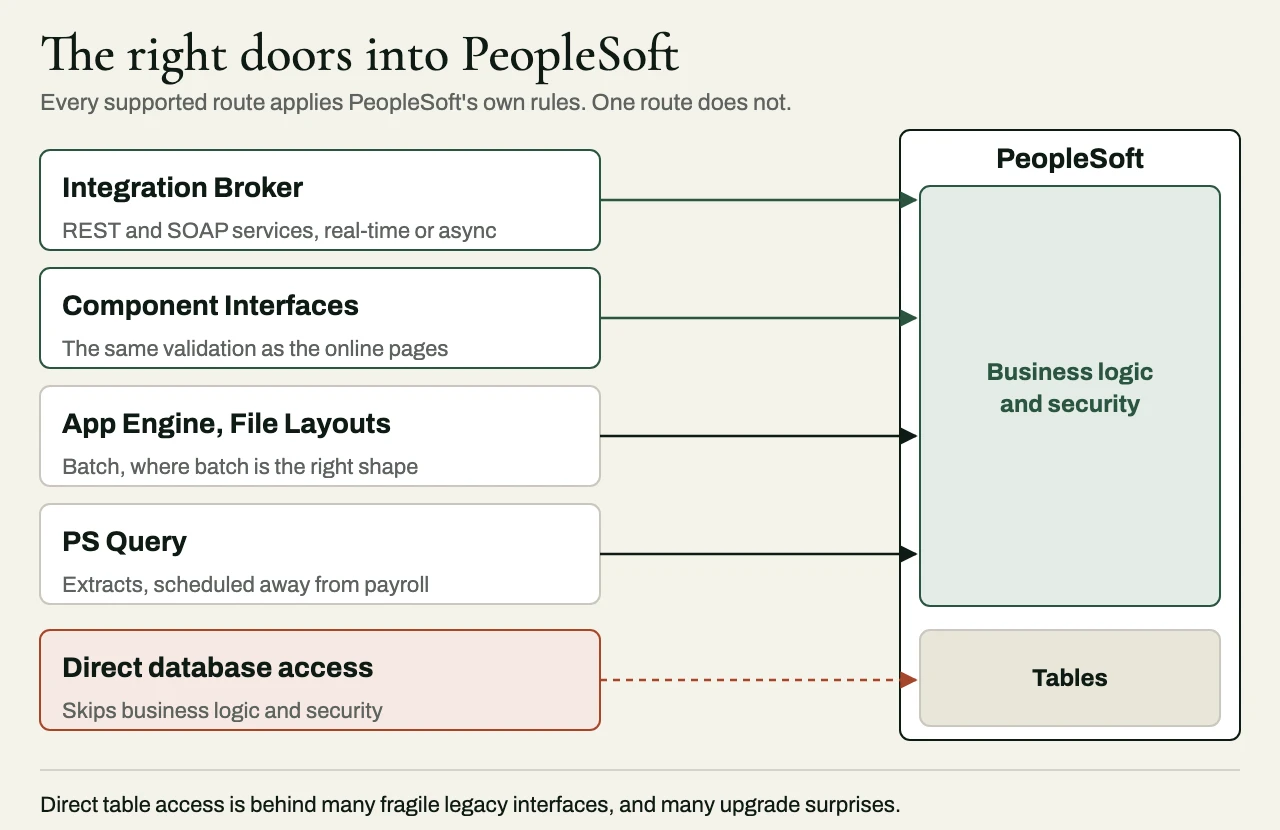
A capable integration partner should be able to explain when to use each of these tools, and, just as important, when to leave them alone:
| Tool | Good for | Watch out for |
|---|---|---|
| Integration Broker | Service operations and routings for real-time and asynchronous messaging, including REST and SOAP services | Setting up routings and logging so messages can be traced when something stops arriving |
| Component Interfaces | Programmatic access that applies the same business logic and validation as the online pages | Performance at volume, since some components behave badly when they’re driven programmatically |
| Application Engine and File Layouts | Batch integration where batch really is the right shape, such as large periodic extracts and loads | Using batch for things that need to be timely, and the design of restart and recovery |
| PS Query and reporting extraction | Getting data out for downstream systems | Adding load during payroll or financial close, and security on query access |
| Direct database access | Occasionally, read-only, for specific bulk needs | Bypassing PeopleSoft’s business logic and security, which is where a lot of fragile legacy interfaces came from |
A partner who reaches for direct table access by default is, in effect, building the next generation of interfaces that somebody else will one day have to untangle.
What to look for in a partner
They respect the customizations
Most PeopleSoft estates are customized, and the customizations are usually there for a reason. A good partner takes the trouble to find out what that reason is before proposing to work around them, and designs its interfaces so the customization footprint doesn’t grow any further.
They design for upgrades
Every interface should survive the next PeopleTools update and PeopleSoft Update Image without rework. It’s worth asking a prospective partner exactly how its designs keep integrations away from PeopleSoft’s internal table structures, because the answer tells you a great deal about how the firm thinks.
They make interfaces observable
When an interface stops working, someone needs to find out quickly – and from monitoring, before any user has to complain. A competent partner will provide monitoring and alerting as a matter of course, along with a way to trace an individual message or record from the source all the way to the target.
They know when batch is right
Real-time integration isn’t automatically better. Payroll and financial processes often run on cycles for good reasons, and a partner should pick the shape of an integration to fit the business process, whatever happens to be in fashion at the moment.
They handle sensitive data properly
HR and payroll data is some of the most sensitive information an organization holds. Ask how access is scoped, where the data is staged while it’s in transit, and how the test environments get populated.
Questions to ask before you sign
- Which PeopleSoft pillars have you integrated – HCM, Financials or Campus Solutions, for example – and with which target systems?
- How would you inventory our existing interfaces, and what would you need from us to do it?
- For our requirements, when would you use Integration Broker, Component Interfaces or Application Engine, and why?
- How will your interfaces behave during our next PeopleTools update?
- What happens when a message fails at 2 a.m. in the middle of a payroll run?
- What documentation and runbooks do we get at handover?
- Do you also sell PeopleSoft implementation or managed services, and if you do, how do you avoid competing with our existing partner?
Red flags
Some warning signs are worth naming plainly. I’d be wary of a proposal that says nothing about how the existing interfaces will be found and documented, and of a partner whose habit is to read from and write to the database directly. A proposal that doesn’t discuss what upgrades will do to the interfaces is incomplete, and so is one that offers real-time integration everywhere without a word about payroll or close cycles. And a partner that can’t explain how failures will be detected, other than by users reporting them, hasn’t yet thought seriously about running the integration in production.
Engagement shapes that work
Partners and clients usually bring in an integration specialist in one of three ways. A scoped work package, quoted at a fixed price for a defined integration with acceptance criteria, is a low-risk way to find out whether a firm behaves the way it says it does. Embedded engineers – named people, working inside your team and your tools – suit the length of a program or an upgrade. And architecture-only engagements provide senior architecture ownership for up to ten days a month, for the case where your own team can build but wants its decisions examined and defended.
A client example: PeopleSoft HCM in a hybrid estate
The situation
A public-sector organization with about 12,000 employees was keeping PeopleSoft HCM as its system of record while it brought in a cloud identity platform and a new benefits administrator. The official interface inventory listed eight feeds. When we went through the infrastructure logs and the database audit information, though, we found several more service accounts running scheduled queries against PeopleSoft tables – among them a departmental reporting tool that read employee status directly, and an old benefits extract that depended on a customized view nobody had documented.
What we did
We built the inventory from Integration Broker and Process Scheduler, a review of the SQR and Application Engine jobs, the service-account and database access logs and the outbound file locations, and then interviews with the payroll, benefits and identity owners. Every interface was recorded with its direction, schedule, data owner, effective-dated logic, security model and payroll blackout window. We classified the direct table readers by risk, and left each one alone until we knew who depended on it downstream.
Two defects came out of that work. The identity feed treated a future-dated termination row as effective immediately, so people lost access before their last day, and the benefits extract ran before the final payroll correction batch and missed retroactive changes. Both come down to the same thing – with effective-dated data, the latest row isn’t always the one in force. We added explicit effective-date rules, replaced the brittle direct queries with governed extracts and services where that was practical, and validated the changes against two payroll cycles, retroactive adjustments included.
The result
The inventory grew from eight interfaces to fourteen. Before the upgrade, we retired three unsupported reads and moved the two highest-risk feeds onto supported integration patterns, and the next team to work on the estate inherits a documented list of interfaces in place of a mystery.
Related reading
- SAP integration options: IDoc, BAPI, OData or Integration Suite?
- How to scope integration work in a statement of work
Working with eProxim
eProxim doesn’t run a PeopleSoft practice. We work alongside the partners and in-house teams who own PeopleSoft, and we build the layer between it and everything it has to agree with – HCM integrations with newer payroll, benefits and identity platforms, API facades, the untangling of legacy interfaces, and integration capacity for upgrades.
We build our interfaces to enterprise defaults – idempotent processing, retry and dead-letter handling, audit trails and a documented rollback path – because those are the environments our integrations have always run in. Several of them are still in continuous production, and one has been for more than a decade.
Bring us the PeopleSoft integration work you’d prefer not to hire for. Take a look at our PeopleSoft partner page, or start a partner conversation.