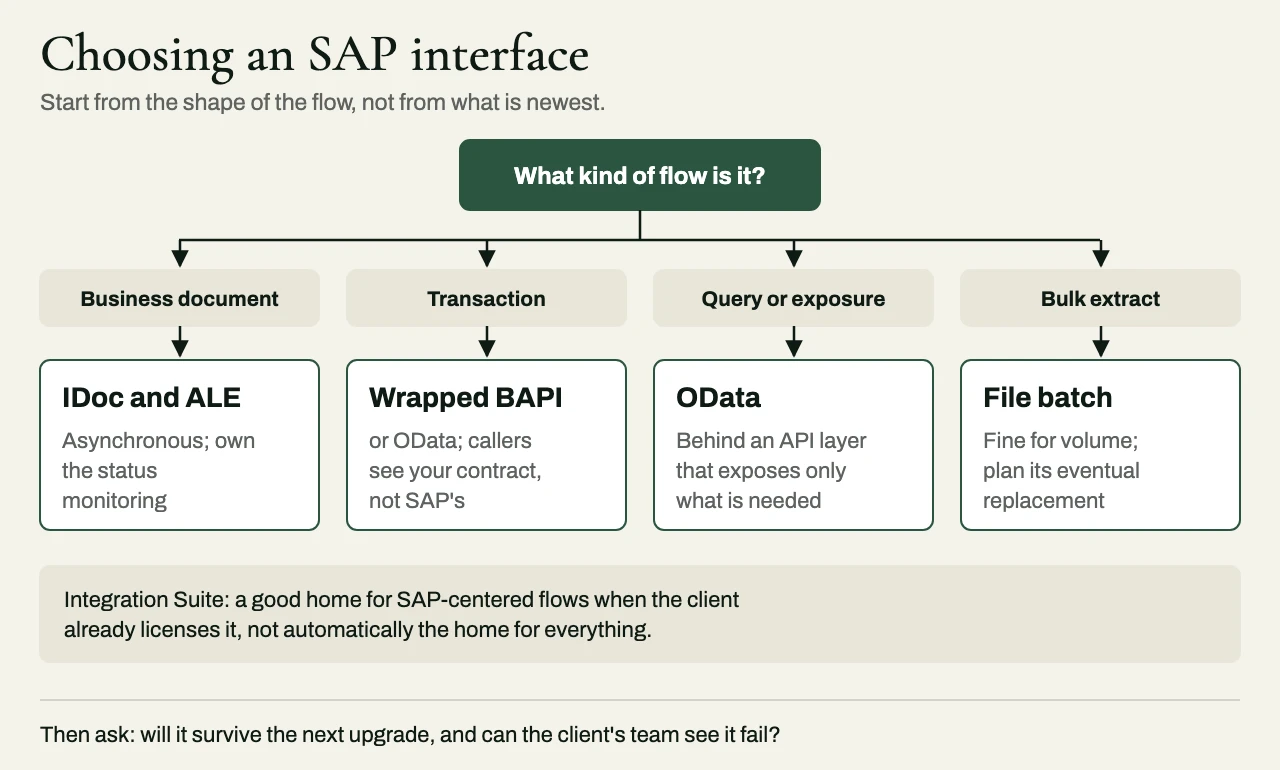
Most decisions about SAP integration turn on a question that hardly anyone asks out loud – will this interface still work after the next upgrade? SAP offers several ways in and out. Some of them are decades old and are still the right answer for particular jobs, while others are newer and preferred for S/4HANA. So choosing among the SAP integration options has little to do with which one is most modern. What matters is which one fits the data, the volume, the direction of flow and the future of the system.
In this guide, I compare the main options, explain when each one is the right choice, and set out the questions that usually settle the decision.
SAP capabilities vary by release, deployment model and license. Confirm the specifics against the client’s own SAP systems.
The options at a glance
| Interface | Best for | Direction | Watch out for |
|---|---|---|---|
| IDoc and ALE | Document-level business messages – orders, deliveries, invoices and master data – exchanged asynchronously | Both | Silent failures, if nobody sets up and owns IDoc status monitoring |
| BAPI and RFC | Synchronous transactional calls into ECC or S/4HANA where there’s no newer interface | Mostly inbound to SAP | Tight coupling to SAP’s internal behavior, which callers should be shielded from |
| OData through SAP Gateway | Giving applications clean, RESTful access to SAP data and operations, especially on S/4HANA | Both | Exposing more than consumers need, and performance on large datasets |
| Integration Suite (CPI) | Orchestration, mapping and connectivity, where the client has already licensed it | Both | Using it for everything just because it’s there, including work that belongs elsewhere |
| File-based batch | Large periodic extracts where timing isn’t critical | Both | Quietly becoming permanent when it should have been replaced |
IDoc and ALE: still the right answer for business documents
IDocs are SAP’s long-standing format for exchanging business documents. They’re asynchronous and structured, and SAP teams know them well. For sending purchase orders to suppliers, receiving invoices or distributing master data, they’re still a sound choice.
The usual trouble comes when an IDoc fails, and the IDoc format itself is rarely to blame. An IDoc stuck in an error status can sit there unnoticed for days, unless someone really owns the monitoring. So any interface built on IDocs needs alerting on failed statuses, a defined procedure for reprocessing, and a reconciliation of what was sent against what was received.
BAPI and RFC: transactional calls, wrapped
BAPIs are SAP’s business APIs, called over RFC, and they let an external system create or change a business object – a sales order, say, or a goods movement – with SAP’s own validation applied. They work, and on older ECC systems they’re often the only option for certain operations.
Their weakness is coupling. An external application that calls BAPIs directly gets tied to SAP’s internal structures and behavior, and every change in SAP becomes its problem. The better pattern is to wrap BAPI calls behind a service of your own, so the callers see a stable contract, and only the wrapper has to change when SAP does.
OData: the modern surface
On S/4HANA, OData services exposed through SAP Gateway are the standard way to give applications access to SAP data and operations. They’re RESTful, they sit comfortably alongside web and mobile applications, and they can be scoped to exactly what a given consumer needs.
That last point matters more than it might seem. A common request is to show SAP data (order status, invoices or availability, for example) in a customer-facing application, without giving that application any access to SAP itself. A well-designed OData service, or an API layer in front of it, exposes only what the application needs, and keeps everything else out of its reach.
Integration Suite: use it for what it is good at
SAP Integration Suite, which used to be called Cloud Platform Integration, provides managed integration flows, prebuilt content for common SAP scenarios, and connectivity to both cloud and on-premises systems. Where the client has already invested in it, it’s often the right home for flows centered on SAP.
That doesn’t make it the right home for everything. Complex orchestration that has little to do with SAP, high-volume event streaming, or logic that really belongs to another system may sit better in the client’s existing middleware, or in a purpose-built service. The test I’d apply is maintainability. Who will understand this flow, and be able to change it, three years from now?
How to choose
Five questions usually settle it. The first is whether the flow is a business document, a transaction or a query – documents suit IDocs, transactions suit wrapped BAPIs or OData, and queries suit OData. The second is whether the flow has to be synchronous. If the caller has to wait for SAP’s answer, asynchronous patterns are ruled out, and if it doesn’t, they should be preferred.
The third question is what will still be there after the next upgrade. On an S/4HANA journey, released and supported interfaces should win over custom function modules or direct table access. The fourth is what the client already runs and supports, because a technically superior interface that the client can’t operate is, in practice, the worse choice. The fifth is how anyone will notice a failure. Every option needs monitoring, alerting and reconciliation, and the right one is the one the client’s team can actually keep an eye on.
Batch to events during an S/4HANA program
Many organizations treat an S/4HANA program as the moment to move from nightly file transfers to event-driven integration. The instinct is sound, but the change is far easier to make in stages. The batch interface should keep running while its event-driven replacement runs alongside it, the two should be reconciled until they agree across several cycles, and the batch interface should only be retired once every downstream consumer has moved over. Trying to change the ERP and every interface around it in one cutover piles the risk up at exactly the wrong moment.
A client example: exposing SAP to a customer portal
A manufacturing group rolling out S/4HANA wanted a customer portal for order status, availability and delivery information. One plant was still on ECC, and the first design had the portal calling BAPIs directly. That’s fine for a prototype, but it ties the portal to SAP’s internal structures, puts synchronous load on SAP, complicates authorization, and lets every difference between ECC and S/4HANA surface in the portal.
We put a versioned API layer between the portal and SAP. For the S/4HANA plants it consumed released OData APIs, and for the ECC plant it wrapped an existing BAPI behind the same business contract. Shipment updates moved asynchronously, and Integration Suite handled mediation, connectivity and monitoring. The contract used the portal’s own order identifiers and normalized status codes, with no SAP table names anywhere in it, plus pagination, timeouts, authorization scopes, correlation IDs and caching for read-only queries.
The portal ended up with one contract across both ERP generations, and far fewer point-to-point changes during the migration. Regression tests check that the ECC and S/4HANA adapters return equivalent responses for the same business cases, so when the ECC plant moves, only what sits behind the API changes.
Related reading
- How to scope integration work in a statement of work
- Choosing a PeopleSoft integration partner
- ServiceNow ITFM integration: getting cost and finance data in and out
Working with eProxim
eProxim doesn’t run an SAP practice. We work alongside system integrators and SAP partners, and we build the layer between SAP and everything it has to agree with – OData services and API layers, monitored IDoc interfaces, wrapped BAPI and RFC calls, Integration Suite flows where the client already has it, and the move from batch to events.
Bring us the SAP integration work you’d prefer not to hire for. Take a look at our SAP partner page, or start a partner conversation.