An integration dashboard full of green ticks tells you that the jobs ran. It can’t tell you whether the order count in the commerce platform matches the ERP, whether every payment made it to the ledger, or whether some record was quietly rejected three weeks ago. Those are different questions, and they’re the ones the business actually cares about.
A reconciliation report exists to answer them. It compares what one system says with what the other says, explains the differences, and gives someone the evidence they need to sign off. For any integration that carries money, inventory or regulated data, I’d call it essential – it’s the only way the business can know that the integration works at all.
Three levels of reconciliation
Good reconciliation works at more than one level, because each level catches problems the others miss.
| Level | Compares | Catches |
|---|---|---|
| Control totals | Counts and sums by period, entity, currency or category | Missing batches, duplicated loads, wrong periods |
| Record-level matching | Individual records by a shared identifier | Specific missing, duplicated or rejected records |
| Field-level comparison | Key fields on matched records | Records that exist in both systems but disagree on amount, status or date |
Control totals are cheap, and should run every time. Record-level matching does most of the real work, and field-level comparison is best kept for the fields that matter most, such as amounts and statuses.
The shared identifier
Record-level reconciliation depends on being able to match a record in one system with its counterpart in the other, and that needs a shared identifier stored in both – either the source record’s ID carried into the target, or an external ID held on both sides. If an integration was built without one, adding it is usually the first job. You can match on names, dates and amounts, but it’s slow and ambiguous, and nobody ever entirely trusts the results.
Separate timing differences from real exceptions
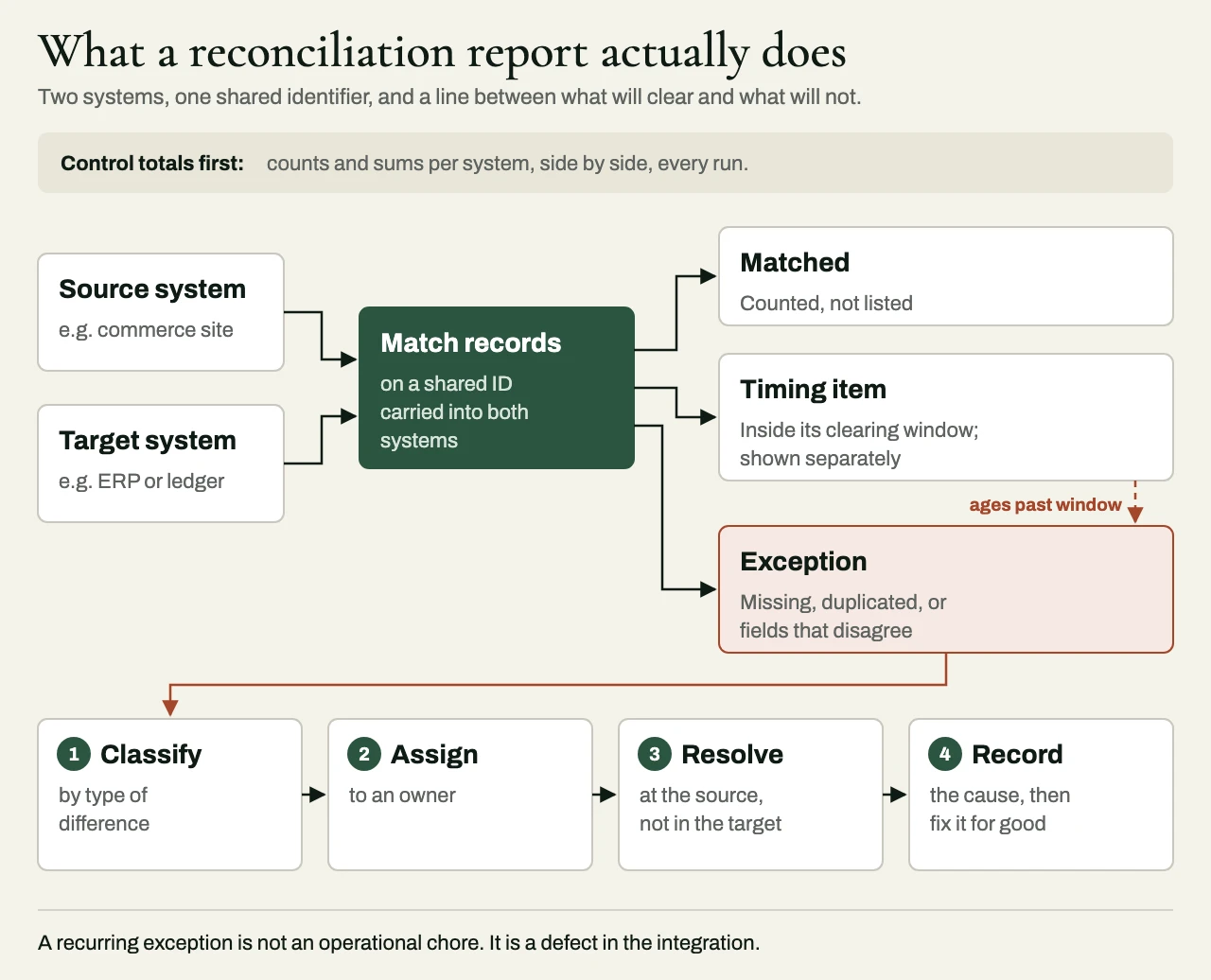
Systems rarely agree at every instant. An order placed at 11:59 p.m. may reach the ERP after midnight, a payment settles a day after it’s captured, and a journal may post in the following period. So a good report separates timing differences, which are expected to clear within a defined window, from genuine exceptions, which won’t clear on their own and need someone to act.
The distinction matters more than it might seem. A report that flags every timing difference as an error teaches people to ignore it, and a reconciliation report nobody reads is worse than having none, because it gives the impression of control without any of the substance. Define the windows in advance, show the items still inside them separately, and escalate only the ones that have aged past their window.
What the report should show
A reconciliation report someone can act on usually starts by stating its period and scope – which systems, entities and record types it covers. Then it puts the control totals for each system side by side, with the difference, along with a count of the matched records (a count is enough, and nobody needs the list). The heart of the report is its exceptions, each shown with the record identifier, the type of difference, its age and its owner. After those come the timing items that are still within their window, and a trend that shows whether exceptions are growing or shrinking over time.
The report should run on a schedule, reach the people who own the exceptions, and keep its history, so that any past period can be looked at again.
Exception management
The report is only half of the system. The exceptions it turns up need a workflow of their own. Each exception should first be classified – usually as missing in the target, missing in the source, duplicated, or mismatched on a field. Then it should be given an owner according to its type, whether that’s operations, finance or the integration team. It should be fixed at the source of the problem, and never by editing the target to match, and the fix should be recorded, so that recurring causes can be corrected in the integration itself.
I would go further. When the same kind of exception keeps coming back, calling it an operational chore lets the integration off the hook – it’s a defect in the integration, and it should be treated as one.
Building it in from the start
Reconciliation is far easier to design into an integration than to bolt on later, and a few habits, kept from the first working interface onward, make it straightforward. Carry source identifiers into the target. Log every batch and message with an ID. When a record is rejected, store it along with the reason, instead of dropping it. And agree the control totals with finance or operations before testing begins, so the reconciliation report becomes part of acceptance, and doesn’t end up as an afterthought.
A client example: from month-end spreadsheet to daily report
A multi-channel retailer we worked with processed about 25,000 orders a month. The commerce platform recorded orders and refunds, the payment provider recorded captures, refunds, fees and payouts, and the ERP recorded receivables and cash application. The three systems used different transaction identifiers and different accounting dates, so after every month-end the finance team spent three to four days comparing spreadsheets.
We built a transaction-level reconciliation ledger with stable mappings from each order to its payment capture, refunds, payout balance transaction, ERP document and bank settlement. The daily report classifies every exception by type – captured but not posted, posted but not settled, refund awaiting its payout impact, fee not mapped, duplicate ERP posting, or amount mismatch – and each type has an owner. The report also says plainly whether a figure uses the transaction date, the posting date or the settlement date.
Behind the report sit three separate health checks: execution health (did the job run and authenticate?), completeness (were the expected partitions and record volumes there?) and financial control totals (did counts and gross and net amounts agree by date and currency?). A job that succeeds with zero source rows fails the completeness check, unless zero was the expected answer.
After two months of stabilization, month-end work fell from as much as four days to half a day, and 99.7% of transactions were matched automatically by the second business day, with the rest assigned to named owners. Timing differences still turn up, as they always will. What changed is that none of them stays unexplained once the agreed settlement window has passed.
Related reading
- Idempotent webhooks: duplicates, retries and out-of-order events
- ServiceNow ITFM integration: getting cost and finance data in and out
- Stripe integration beyond checkout
Working with eProxim
Reconciliation is built into the integrations eProxim delivers, because the systems we connect usually carry money. We design control totals, record matching and exception workflows that finance and operations can sign off on, and we add reconciliation to integrations that other teams have built.
Need proof that your client’s systems agree? See our enterprise integration services, or start a partner conversation.