Salesforce is where the deal is won, and NetSuite is where it turns into an order, an invoice and, eventually, revenue. The integration between the two is one of the most common in mid-market and growing companies – and one of the most common places for data to drift apart quietly, without anyone noticing for months.
A NetSuite Salesforce integration looks simple on a whiteboard. Accounts, opportunities and orders flow one way, and invoices and payment status flow back. In production, though, it has to cope with duplicate customers, orders that change after they’re created, partial fulfillment, credit memos, multiple subsidiaries and NetSuite’s governance limits. In this article, I’ll go through the design decisions that keep the two systems in agreement.
Decide the system of record, object by object
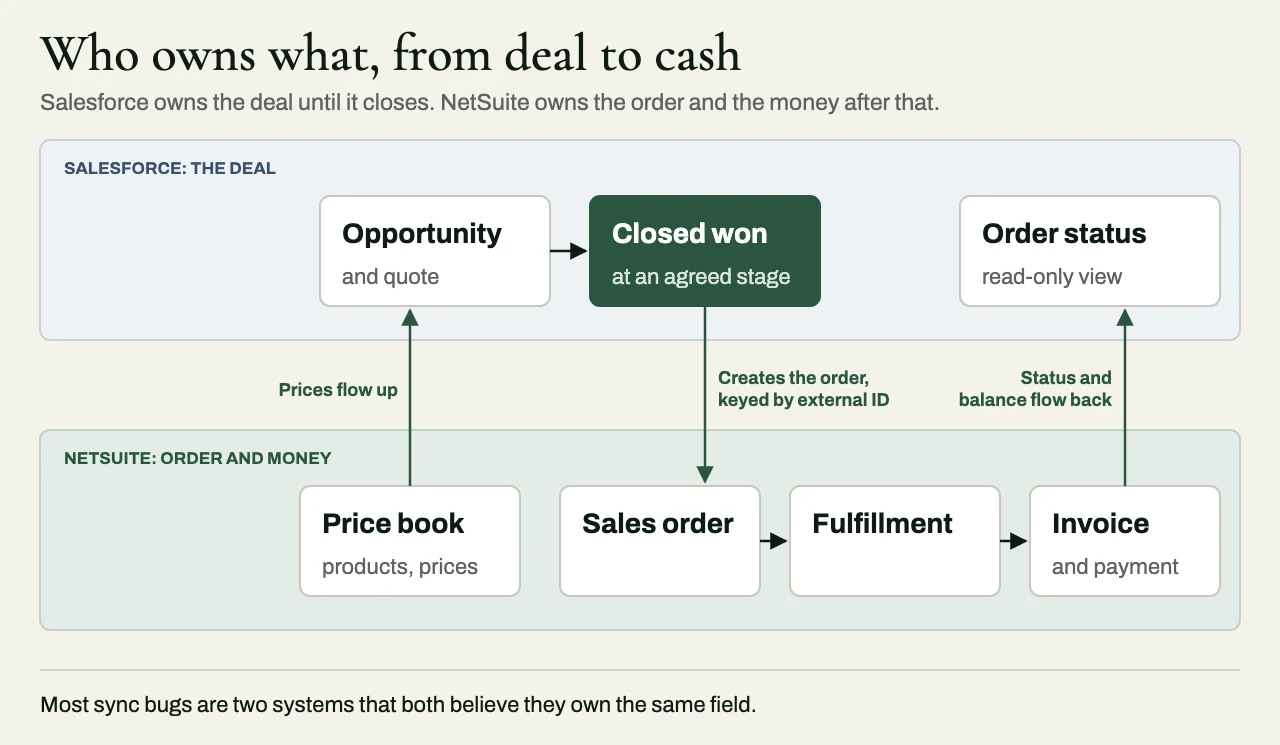
Most of the problems in this integration go back to a single decision that nobody ever made out loud: which system owns each object, and, for the objects that sync in both directions, which system owns each field.
| Object | Usual owner | Flows to | Notes |
|---|---|---|---|
| Account / customer | Salesforce until first order, then shared | NetSuite | Financial fields (terms, credit limit, tax) owned by NetSuite |
| Contact | Salesforce | NetSuite | Billing contacts may need to be owned by finance |
| Product and price | NetSuite | Salesforce | Pricing shouldn’t be changed in two places |
| Opportunity / quote | Salesforce | Not synchronized | Becomes an order in NetSuite at an agreed stage |
| Sales order | NetSuite once created | Salesforce (status) | Changes after creation need a defined path |
| Invoice and payment | NetSuite | Salesforce (status, balance) | Read-only in Salesforce |
A table like this should be written down for the client’s actual objects before anyone builds anything. In my experience, most of what gets called a synchronization bug is really just two systems that each believe they own the same field.
Stop duplicates before they start
Duplicate customer records are the most common long-term failure of this integration, and they come from a handful of predictable places. The first is matching on names, which is how “Acme Inc” and “ACME, Inc.” quietly become two customers. Matching should depend on a stored external ID, and never on names or email domains. The second is retrying without idempotency – a request times out after NetSuite has already created the record, the integration retries it, and now there are two. With external IDs, a retry updates the record that’s already there, and nothing new gets inserted.
The third is letting both systems create records. If sales and finance can both create customers, they will, so the design has to decide where creation happens and then enforce it. The fourth is having no exception handling at all. When a match is uncertain, the integration should stop and ask a person, and it shouldn’t guess. Cleaning up duplicates after a year in production is far harder than preventing them in the first place.
Orders change after they are created
The opportunity closes, the order is created, and then the customer changes the quantity, the ship date or the billing contact. The integration needs a considered answer for each kind of change: which edits in Salesforce are still allowed once the order exists in NetSuite, whether they’re applied automatically or sent to someone in order management, and what should happen to an order that’s already been partly fulfilled or invoiced.
A common approach, and a sound one, is to let Salesforce own the commercial agreement until the order is created. From then on, NetSuite owns the order, and Salesforce simply shows its status.
From closed-won opportunity to sales order and invoice
The question I hear most often about this integration is when the sales order should be created. My answer is that it should be created once, at a single agreed trigger, and in most companies that trigger is the opportunity reaching Closed Won with the fields finance needs already filled in: the bill-to customer, the subsidiary, the payment terms and products that exist in NetSuite. Celigo’s packaged Salesforce–NetSuite app follows the same basic pattern, turning opportunities into NetSuite sales orders. Creating the order earlier, at proposal or negotiation, fills the ledger with orders that never happen, and leaving it to someone to key in by hand brings back the re-entry the integration was meant to remove.
Quotes are a separate matter. A quote is a commercial draft, and it belongs in Salesforce. Only the accepted quote’s lines should become order lines in NetSuite, matched on each item’s NetSuite internal ID or an external ID, so that renaming a product in Salesforce doesn’t break the mapping. If the client uses Salesforce CPQ, amendments need particular care. Amending a contract in CPQ creates a new amendment opportunity and an amendment quote, priced on the difference from the original. Send that to NetSuite as one more closed-won deal, and you have a second sales order for a customer who only changed a quantity. The integration has to recognize an amendment and, with finance, decide what it becomes: a change to the open order, a new order for the added quantity alone, or a credit memo. The answer depends on whether the original order has already been fulfilled or invoiced.
Invoices and payments flow the other way. NetSuite creates the invoice from the sales order, and Salesforce should receive its number, date, amount, balance due and status as read-only fields, either on the opportunity or on a related invoice object, so that account managers can see what has been billed and paid without calling finance. Payments, credit memos and refunds all change that balance, so the sync should be driven by those transactions, run on a short and bounded schedule, and show the time of the last update next to the figures. When a balance in Salesforce disagrees with NetSuite, NetSuite is right, and the reconciliation report described below is how you find out.
Design for NetSuite’s governance limits
NetSuite limits concurrent requests and script usage, and a busy integration can hit those limits at the worst possible moment – usually at month-end, or in the middle of a large import. It’s far better to design for the limits up front than to discover them in production. That means using SuiteTalk for record-level NetSuite integration, and SuiteQL or saved searches for set-based reads, instead of thousands of individual calls. It means queuing outbound work and processing it at a controlled rate, with retries and backoff, and using SuiteScript or Map/Reduce where the logic is better done inside NetSuite than through a round trip. And it means watching for concurrency errors, and alerting on them before they pile up into a backlog.
NetSuite and Salesforce limits depend on edition and licensing, so check the client’s account before you size the design.
Subsidiaries, currencies and tax
OneWorld accounts bring in subsidiaries, currencies and intercompany rules. The integration has to know which subsidiary an order belongs to, which currency it’s priced in and which tax rules apply – and those are usually decisions for finance to make, and not for the integration team.
Syncing Salesforce custom objects with NetSuite
Most mature Salesforce orgs carry custom objects that finance cares about, such as a project, a subscription, a site or a commission split. Sooner or later someone asks for one of them in NetSuite, and the first design question is what it should become there. Quite often the right answer is a few custom fields on a record NetSuite already has. A transaction body field (its ID begins with custbody) or a line field (custcol) will carry a project code or a contract reference perfectly well, and it keeps the data on the transaction, where finance will look for it. When the object has a life of its own, with its own status and several related transactions, it deserves a custom record type in NetSuite. SuiteTalk REST web services handle custom records directly: an instance is addressed by the custom record type’s script ID under the record/v1 path, and the metadata catalog returns custom fields along with the standard ones, so the integration can read the definitions without hard-coding them.
Connectors are where expectations need managing. Celigo’s packaged Salesforce–NetSuite app is built around the standard objects (accounts, contacts, opportunities, orders, items and fulfillments), and its published scope doesn’t mention custom objects, so expect to confirm with Celigo whether a custom object needs its own flow built on their platform. Oracle’s own Salesforce Connector, which arrived in NetSuite Connector with the 2025.2 release, added custom data syncs in 2026.2. They map supported NetSuite records to Salesforce objects, each sync runs in one direction only, and a Salesforce custom object needs a field configured as both External ID and Unique before it can take part.
Those limits are reasonable, and they show where the connector stops and the design work starts. Two one-way syncs pointing at each other don’t make a two-way sync with conflict rules. A connector will map the fields, but it won’t decide which system owns each of them, what should happen when a child record is deleted, or what to do when the custom object refers to a NetSuite record that doesn’t exist yet. The external ID requirement is worth adopting everywhere, connector or no connector, for the same reason it prevents duplicate customers: it gives every retry something stable to match on.
Prove it agrees
A sync that runs without errors tells you that it ran. Whether the two systems actually agree is a separate question, and only a reconciliation report can answer it. Build the report from the start. For a given period, it should compare customer counts and mapping exceptions, the closed-won value in Salesforce against the order value in NetSuite, and the invoice and payment status in NetSuite against what Salesforce shows. It should run on a schedule, and list every exception for someone to resolve.
A client example: replacing a connector that drifted
A software services company had run an off-the-shelf Salesforce–NetSuite connector for several years. Customer names, invoice statuses and billing contacts didn’t agree, and finance kept a spreadsheet of the accounts it trusted. The connector did broad two-way updates with no field-level ownership, so an account edit in Salesforce sometimes overwrote the legal billing name in NetSuite, while invoice status updates ran only overnight and now and then failed without raising an exception anyone saw.
We started with a field-by-field system-of-record decision. NetSuite owned the legal entity, billing terms, invoice balances and payment status, and Salesforce owned segmentation, opportunities and account-manager assignments. A cross-reference tied Salesforce account IDs to NetSuite internal IDs, with separate rules for subsidiaries and bill-to entities. The new flows were incremental, with durable checkpoints, retry-safe writes and an exception queue for ambiguous matches, and invoice status came from NetSuite transactions instead of a status field that CRM users edited by hand. Before switching the connector off, we ran an initial reconciliation, made corrections the business owners approved, and ran old and new in parallel.
Invoice status used to lag by 24 to 48 hours, and now normally arrives within 10 to 15 minutes. (We promised a bounded window, since NetSuite’s API limits and batch posting make real time an empty promise.) Unresolved customer mismatches fell from several hundred to a few dozen reviewed exceptions, and finance retired its spreadsheet once it agreed that the daily report explained every remaining difference.
Related reading
- Integration reconciliation reports: proving two systems agree
- Rescuing an ERP or Salesforce project
- Idempotent webhooks: duplicates, retries and out-of-order events
Working with eProxim
eProxim doesn’t run a NetSuite or Salesforce implementation practice. We work alongside the partners who own those platforms, and build what keeps them consistent: two-way synchronization with conflict rules, deduplication and survivorship, SuiteTalk and SuiteQL integration designed around governance limits, and reconciliation reporting that finance can sign off on.
Bring us the CRM-to-ERP work you’d rather not hire for. See our NetSuite partner page, our services for Salesforce partners, or start a partner conversation.