The S/4HANA migration integrations are the interfaces that connect an SAP system to everything around it, and they are the part of a migration program that gets planned last and blamed first. The functional workstreams have their fit-gap sessions and their simplification-list reviews, the data team has its load cycles, and somewhere in the plan there is a line that says “interfaces: retest”. That line usually covers a few hundred connections to warehouses, banks, carriers, e-commerce platforms, planning tools and data platforms, many of them built over fifteen or twenty years by people who have since moved on.
This article is about what actually happens to those interfaces when ECC becomes S/4HANA. I’ll go through what carries over unchanged, what changes underneath an interface that looks the same, how SAP’s clean core guidance affects the choices you make, what to do about middleware with an end-of-maintenance date, and how to test and cut over without betting the go-live weekend on a few hundred untested assumptions. The aim is a plan you can defend to the people who own the systems on the other end.
SAP capabilities vary by release, deployment model and license. Confirm the specifics against the client’s own SAP systems and the SAP Notes for their release.
Why the interfaces are where migrations go wrong
An S/4HANA migration changes the system of record while every system that depends on it keeps running. The warehouse still expects its deliveries, the bank still sends its statements, and the planning tool still pulls stock levels at two in the morning. None of those systems is part of the migration program, and their owners often learn about it from a test request that arrives a few weeks before cutover.
The other difficulty is that integrations fail in ways functional testing doesn’t see. A sales order can be created perfectly well in S/4HANA while the IDoc that used to carry it to the warehouse now fails a mapping check, or posts with a field the warehouse quietly ignores. The order exists, the screen looks right, and the shipment never happens. That is why I treat interfaces as their own workstream with their own inventory, owners and test evidence, and why I’d resist any plan that folds them into “regression testing”.
What carries over, and what changes underneath
The reassuring part first. For an on-premise or private cloud S/4HANA system, the classic interface technologies are still there. IDocs and ALE, BAPIs and RFC, and the existing OData services through SAP Gateway all continue to exist, and a good share of interfaces will move across with configuration changes and a retest. Anyone who has been told that “IDocs are gone in S/4HANA” has been told something that isn’t true of these deployment models.
The trouble is in what changes beneath an interface that keeps its name. Three changes come up in almost every program.
Business partner replaces separate customer and vendor masters. In S/4HANA the business partner is the leading object, and customer and supplier records are created from it through Customer/Vendor Integration (CVI). The familiar DEBMAS and CREMAS IDocs were taken off SAP’s simplification list early on, so they can still be used, but inbound processing now creates the business partner first and then lets CVI create the customer or supplier. Business partner grouping, number ranges and required fields that never mattered to the old interface now decide whether it posts. SAP Community guidance generally points new replication work toward the business partner web services.
The material number is longer. S/4HANA extends the material number field from 18 to 40 characters in the database. The extended length is switched off by default, and until it is activated, BAPIs, IDocs, web services and released RFCs keep communicating as before. BAPI structures carry a new long field at the end, and IDoc segments such as E1MARAM gain a MATNR_LONG field next to the original. The risk arrives later, when someone activates long material numbers for a good business reason and every mapping that only knows about the 18-character field starts truncating or failing.
Some functions leave the product. SAP’s compatibility scope let customers keep running certain ECC functions inside S/4HANA for a limited time. Usage rights for most compatibility scope items ended on December 31, 2025, with a few exceptions (parts of LE-TRA, CS and PP-PI among them) running to the end of 2030. SAP Note 2269324 is the authority here and has been revised more than once. Warehouse management is the example that hurts integrations most: classic LE-WM is replaced by Stock Room Management or SAP EWM, and Stock Room Management leaves out decentralized WM and the warehouse control unit interface, among other components. I cover the warehouse case in detail in connecting a warehouse management system to SAP.
Clean core, and what it asks of an interface
SAP’s clean core guidance is about keeping custom work outside the standard product, so that upgrades stay predictable. For integrations, its practical meaning is a preference for released APIs: interfaces SAP has published for customer use and commits to keeping stable from release to release. SAP lists them in the Business Accelerator Hub, along with the events, CDS views and extension points it has released.
SAP now describes extensions on four levels. Level A uses only publicly released interfaces with formal stability contracts. Level B also uses SAP’s classic APIs and technologies, which SAP describes as well-defined, documented and generally upgrade-stable. Level C allows access to SAP internal objects, for legacy scenarios that need it, and level D covers techniques SAP explicitly doesn’t recommend, such as modifications and direct writes to SAP tables.
I find the levels useful because they turn an argument about taste into a classification. An interface that writes directly to SAP tables, or calls a custom function module that does, is a level D problem, and the migration is the cheapest moment you’ll ever have to fix it. An interface that calls a well-documented BAPI may be perfectly acceptable at level B, and rebuilding it just to say you did is money spent on nothing the business will notice. Released APIs also have a lifecycle of their own. SAP has started deprecating some OData V2 APIs once a V4 successor is released, so “released” means supported for now, with a successor named when that changes, and the integration team still has to read the release notes.
Classifying every interface
Before anyone estimates the work, every interface needs a row in an inventory and a disposition. The source for the inventory is the system itself (partner profiles, RFC destinations, Gateway service registrations, the middleware’s own configuration, file jobs in the scheduler) cross-checked against whatever documentation exists, because the documentation is never complete. Each row records the direction, the technology, the business object, the volume, the system on the other end and, most important, a named owner on that other end.
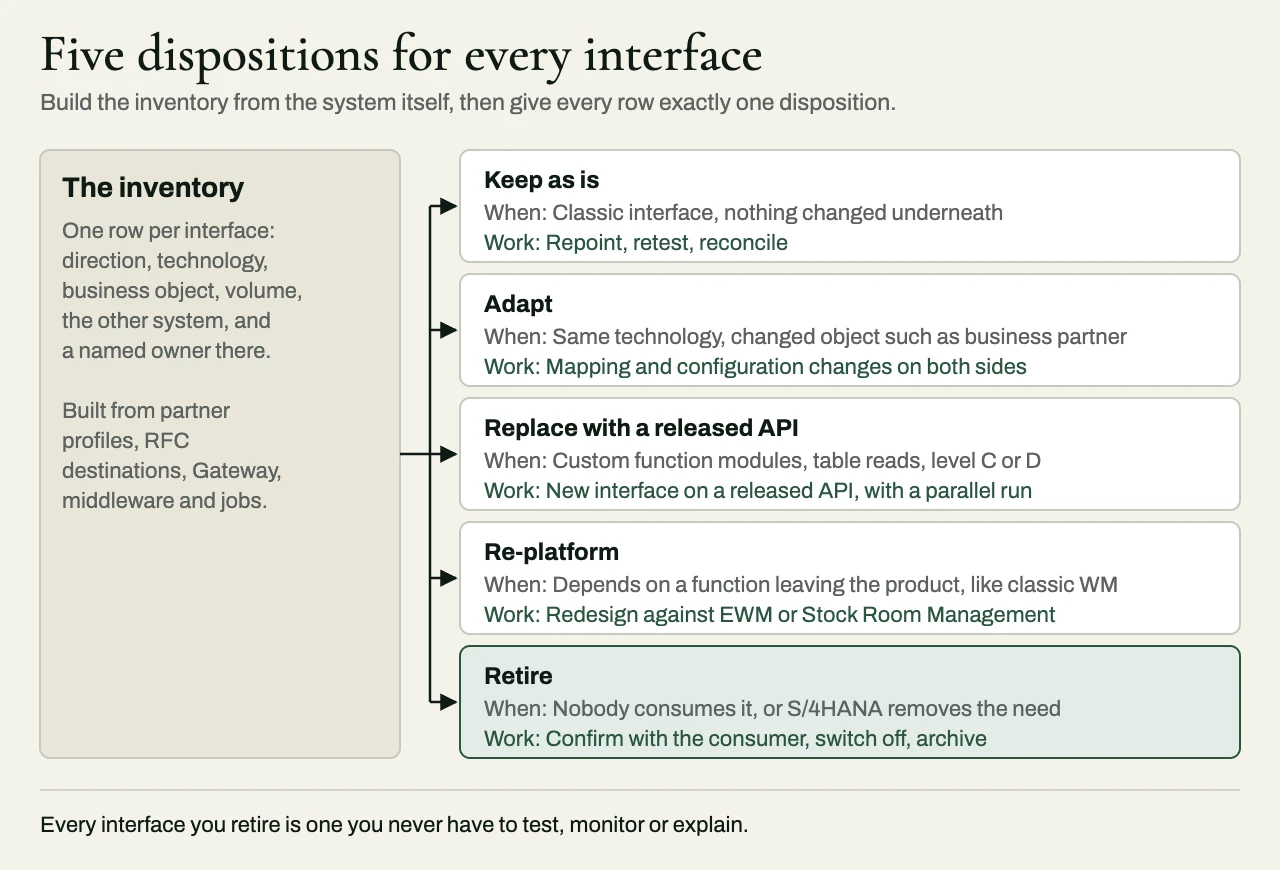
Then each interface gets one of five dispositions.
| Disposition | When it applies | Typical work | Main risk |
|---|---|---|---|
| Keep as is | Classic interface on a stable object, nothing changed underneath | Repoint, retest, reconcile | Assuming “unchanged” without testing the business data |
| Adapt | Same technology, changed object (business partner, long material number, new fields) | Mapping and configuration changes on both sides | Partner systems that can’t change on the program’s timeline |
| Replace with a released API | Custom function modules, table reads, level C or D techniques | New interface against a released API, parallel run | Gaps where no released API covers the use case yet |
| Re-platform | Interface depends on a function leaving the product, such as classic WM | Redesign against the successor (EWM, Stock Room Management) | Scope that belongs to a functional workstream, owned by nobody |
| Retire | Nobody consumes it, or the S/4HANA process removes the need | Confirm with the consumer, switch off, archive | Discovering the consumer at month-end close |
The retire column deserves more attention than it gets. Every older SAP system carries interfaces whose consumers are gone, and each one you retire is an interface you don’t have to test, monitor or explain at three in the morning. The way to find them is to look at actual traffic over a full business cycle, quarter-end included, and to ask the receiving system’s owner directly.
Middleware has a deadline of its own
Many ECC systems talk to the world through SAP Process Integration or Process Orchestration. SAP’s published maintenance strategy gives PO 7.5 mainstream maintenance to December 31, 2027, with optional extended maintenance to December 31, 2030 and no follow-on release, and it positions SAP Integration Suite as the successor. So a lot of clients are now running two migrations that touch the same interfaces: the ERP move and the middleware move.
My advice is to decide deliberately whether to run them together or in sequence, and to write the decision down. Moving the ERP and the middleware at once means one round of testing with every partner, which is attractive, but it also means that when an interface fails in cutover, there are two new components to suspect. Moving the middleware first, against ECC, isolates the risk and lets the team learn Integration Suite on interfaces whose business behavior is already known. A straight one-for-one lift of every PO flow into Integration Suite is possible, but it carries the old design (and its old workarounds) into the new platform, and the inventory above is a better guide to what each flow should become.
Integration Suite doesn’t have to be the home for everything, either. Where the client already runs other middleware well, flows centered on SAP can live in Integration Suite while the rest stay where the client’s team knows how to operate them. The SAP integration options guide sets out how I’d make that choice for each interface.
Testing and cutover
Interface testing on a migration has to prove three things, and they’re different. The first is that the interface works technically, meaning messages flow and post without errors. The second is that the business result is the same, which is the one that catches the silent failures, so for each interface the team should compare what the old system and the new one produce for the same business events: the same delivery, the same goods movement, the same invoice. The third is that operations can see it, because on day one somebody has to know where a failed IDoc, a stuck queue or a rejected API call shows up, and who gets the alert.
For interfaces that matter, a parallel run is worth its cost. The old flow and the new one run side by side against real transactions, a reconciliation compares the results, and the new flow takes over once the two agree across several business cycles. This is also the right moment to change timing where the business needs it, moving a nightly batch to near-real-time events for instance, and the trade-offs there are the subject of real-time vs batch integration with SAP S/4HANA. I’d still keep that change to the interfaces where it earns its place, since a migration weekend is a poor time to change the behavior of every interface at once.
Cutover itself needs an interface runbook: which interfaces are paused and in what order, how in-flight messages and open queues are drained or carried over, which partners are told what and when, and the conditions under which an interface is rolled back. Partners on the other end need their own dates, because their change windows rarely line up with yours.
A checklist for the integration workstream
- Is there an inventory built from the system’s configuration and traffic, and does every row have an owner on the other side?
- Has every interface been given a disposition (keep, adapt, replace, re-platform or retire), with a reason?
- Have business partner, material number length and other simplification-list changes been checked against each interface that touches those objects?
- Is anything still relying on compatibility scope functions, classic WM in particular?
- Is there a decision, in writing, on whether the middleware moves with the ERP or separately?
- Does every interface that changes have a test that compares business results, beyond a check that messages flow?
- Is there a parallel run and reconciliation plan for the critical flows?
- Do operations know where failures appear in the new system, and who is alerted?
- Is there an interface cutover runbook with drain, rollback and partner communication steps?
Related reading
- Integration reconciliation reports: proving two systems agree
- How to scope integration work in a statement of work
- Software project rescue: the warning signs, and what a real rescue looks like
How we approach it at eProxim
eProxim doesn’t implement SAP or sell the migration. We have been engineering integrations since 1997, and on S/4HANA programs we take the interface workstream that the system integrator would prefer not to staff: the inventory and classification, the adapted and replaced interfaces, the parallel runs and reconciliation, the move from batch to events where it is justified, and keeping a bespoke integration working through an upgrade someone else is running. We work alongside the firm that owns the program, and we never compete with it for the client.
You can read more about how we work on SAP systems on our SAP integration page. If you have an S/4HANA migration with more interfaces than anyone has counted, talk to us about it.