A Salesforce ERP integration rarely fails at go-live. The launch has been rehearsed, the data is clean because somebody has just cleaned it, the volumes are modest, and the people who designed the mappings are still on the project. The failures come later, usually some time in the second year – by which point the sales team has doubled, two new fields have been added on each side without anyone telling the integration, the connector has been upgraded twice, and finance has started keeping a spreadsheet of the numbers it actually trusts.
This article is about that second year. I’ll go through the ways a Salesforce ERP integration degrades once the project team has moved on: ownership of fields drifting, API consumption growing into its limits, duplicate accounts piling up, pricing and orders being edited in two places, upgrades breaking assumptions nobody wrote down, and monitoring that reports success while the systems disagree. For each one, I’ll describe the design decision, made at the start, that prevents it. The principles apply whichever ERP sits on the other side. For the specifics of NetSuite, including its governance limits and subsidiaries, see our separate guide to NetSuite Salesforce integration.
Why integrations decay after the first year
An integration is designed against a snapshot of two systems and two organizations, and both of them keep changing. Salesforce ships three major releases a year, administrators add fields and validation rules as the business asks for them, the ERP gets its own upgrades and customizations, and the people who agreed on the original design move on to other work. The integration itself doesn’t change unless someone changes it, so every month the gap between what it assumes and what is actually true gets a little wider.
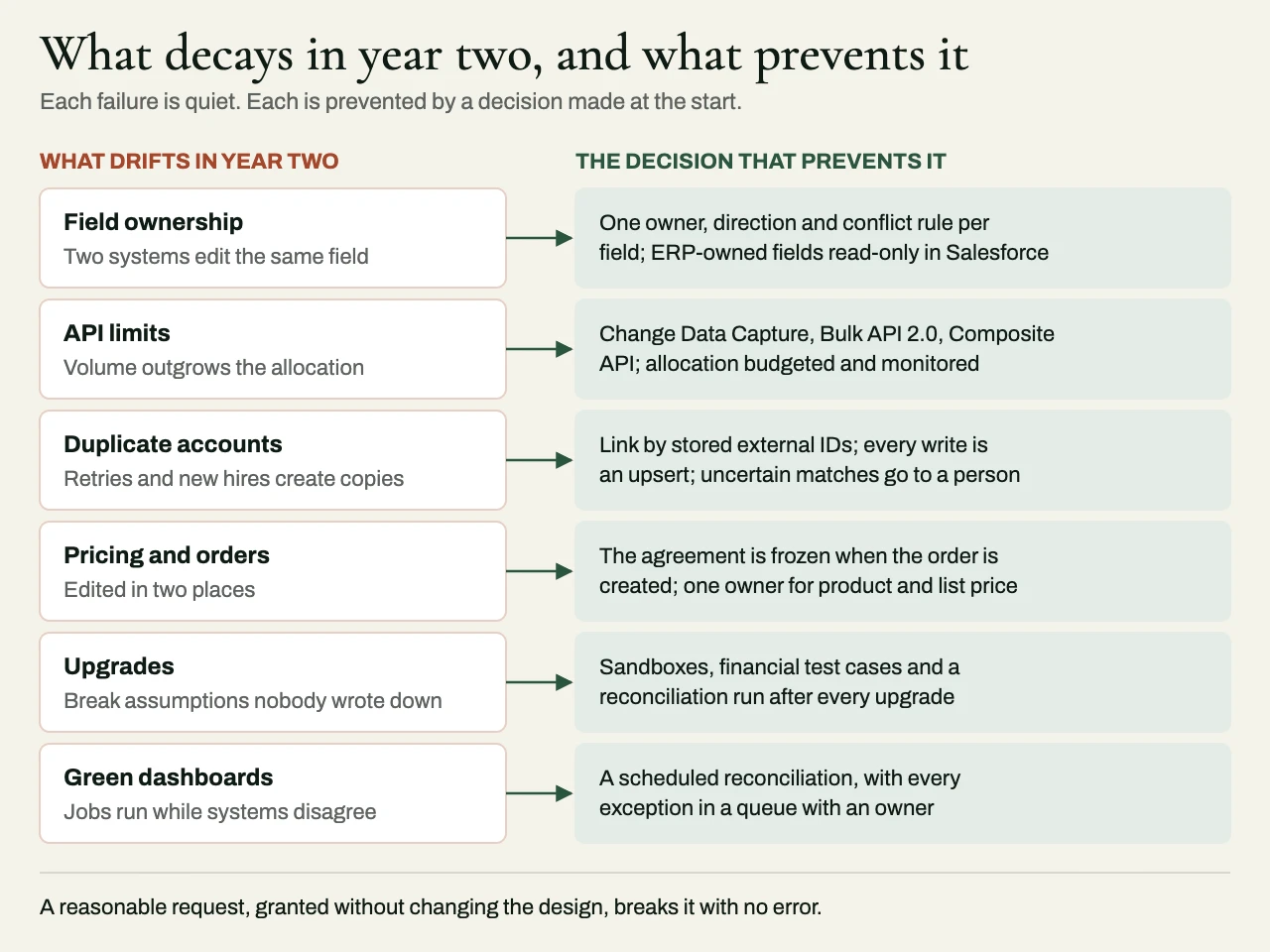
That decay is quiet. The jobs still run and the dashboard still shows green, because nothing has actually thrown an error. What has happened is that a field now edited in both systems is being overwritten every night, or a new record type is being skipped without a word, or retries during a busy week have created a few hundred duplicate accounts that nobody has spotted yet. By the time the business does notice, it’s well past being a bug to fix. It has become a data cleanup, a problem of trust, and a project in its own right.
Field ownership drift
The most common failure in the second year has very little to do with technology. At launch, someone decided that the ERP owns payment terms and credit limit, and that Salesforce owns the account owner and the industry. In year two, a finance manager asks for payment terms to be editable in Salesforce so that sales can quote them, an administrator makes the field editable, and now two systems believe they own the same value. Whichever one synchronizes last wins, and the answer depends on the time of day.
The way to prevent this is to treat ownership as a governed artifact, and to stop thinking of it as an assumption from the design phase. Every synchronized field should have exactly one owner, a direction and a conflict rule, recorded in a document that the Salesforce administrators and the ERP team both have to update before they change the field. The integration should enforce ownership as well as describe it. Fields the ERP owns should be read-only in Salesforce, through page layouts, field-level security or validation rules, so that nobody can edit them only to have their changes quietly overwritten.
| Field group | Owner | Direction | Conflict rule | Why it drifts in year two |
|---|---|---|---|---|
| Account name, owner, industry, segment | Salesforce | To ERP | Salesforce wins; ERP fields are read-only | ERP users rename customers for invoicing |
| Legal name, tax ID, billing address | ERP after the first order | To Salesforce | ERP wins; changes go to finance | Sales edits an address to fix a quote |
| Payment terms, credit limit, credit hold | ERP | To Salesforce | ERP wins; read-only in Salesforce | Sales asks to quote non-standard terms |
| Product catalog and list price | ERP or CPQ, never both | One way only | A single owner, with no exceptions | A second price book appears for a promotion |
| Quote and discount | Salesforce or CPQ | Not synchronized until the order | The agreement is frozen when the order is created | Discounts get edited after the order exists |
| Sales order and fulfillment status | ERP once created | To Salesforce | ERP wins; amendments follow a defined path | Reps edit orders after customer calls |
| Invoice, payment, balance | ERP | To Salesforce | Read-only in Salesforce | Collections notes get typed into invoice fields |
The last column is the whole point of the exercise. Every row describes a reasonable request from a real person, and every one of those requests, if it’s granted without changing the design, breaks the integration in a way no error message will ever reveal.
API limits as volume grows
Salesforce allocates API requests over a rolling 24-hour period – the allowance depends on edition and licenses – and it limits how many long-running requests can run at once. An integration designed when the org had a modest number of accounts and a few hundred orders a day can comfortably make one call per record per change. Two years later, with several times the volume, a nightly full refresh, three other integrations sharing the same allocation and a data team running extracts, the same design runs out of headroom. It typically happens at quarter-end, which is exactly when sales and finance need the data most.
Designing for growth means picking the right interface for each kind of traffic from the start. Record-level changes that need to arrive promptly suit Change Data Capture or Platform Events, which push changes out of Salesforce, so the ERP side doesn’t have to poll for them. Large volumes belong on Bulk API 2.0 so they don’t turn into thousands of individual calls. Related writes can be grouped with the Composite API, so that one logical operation doesn’t cost a dozen requests. Polling for changes on a short interval, and full refreshes of objects that have barely changed, are the two habits that eat the most allocation for the least value, and both are worth removing well before you need to.
It also means treating the API allocation as a shared resource with a budget. You should know every integration, extract and tool that draws on the org’s allocation, and consumption should be monitored with an alert set well below the limit, long before anything hits it. The ERP side deserves the same discipline, since most ERPs impose their own concurrency or usage limits, and the integration has to respect whichever system is the more constrained of the two.
Duplicate accounts
Duplicates pile up in the second year for reasons that are mostly organizational. New sales hires create accounts without searching for them first, lead conversion creates a new account when it should have matched an existing one, an acquisition brings in a list of customers, and a retry during an outage creates the same customer twice in the ERP. Each duplicate then splits the history – orders on one record, invoices on another, and a credit hold that applies to only one of them.
The design decisions that prevent this are easy enough to state. Records should be linked across systems by stored external IDs, and never matched on names or email domains, and every write should be an upsert on that external ID, so that a retried request updates the existing record instead of creating a second one. Customers should be created in the ERP in one way only, typically from Salesforce at an agreed stage, so that finance can’t create a customer the integration doesn’t know about. Salesforce’s duplicate and matching rules should be set to warn or block at the point of entry, and uncertain matches should go to a person – the integration shouldn’t be left to guess. A periodic report of probable duplicates, reviewed by someone who owns data quality, catches the ones that slip through.
Pricing and order ownership
Pricing is where the commercial and financial halves of the business meet, and it’s where integrations most often end up with two sources of truth. A CPQ tool gets added in Salesforce, the ERP still holds the price list, and within a year the two disagree on a set of products nobody can quite list. Orders go the same way. The integration creates the order in the ERP at closed-won, and then a customer call leads someone to amend it in Salesforce, where the change either fails to sync or overwrites an order that has already been partly fulfilled.
The approach that lasts is to decide, explicitly, where the commercial agreement ends and the financial record begins. Salesforce, or the CPQ inside it, owns the quote and the negotiated terms until the order is created. At that moment, the agreement is frozen, the ERP owns the order, and Salesforce shows its status. Amendments after that follow a defined path – usually a change request that order management applies in the ERP – and nobody edits the order directly on either side. Product and list price should have a single owner, and if CPQ needs the price list, it should get it from that owner and never keep one of its own.
Connector and platform upgrades
Packaged connectors are a sensible way to start, and plenty of integrations run well on them. The risk in the second year is that every upgrade – of the connector, of Salesforce or of the ERP – can change behavior the business has come to depend on. A connector release changes how it handles a null value, a Salesforce release tightens a security default, an ERP upgrade renames a field, and older Salesforce API versions are retired on a published schedule, which sooner or later catches any integration pinned to one of them.
Upgrades become survivable when you have something to test them against. That means a pair of sandboxes kept reasonably close to production, a set of integration test cases covering the flows that matter financially, and a reconciliation run after every upgrade that compares the two systems before and after. It also means keeping customization of a packaged connector to a minimum, because every customization is something the vendor’s next release didn’t anticipate. Once the integration has outgrown what the connector does well, replacing it deliberately costs less than patching it after every release.
Monitoring that proves agreement
Most integration monitoring tells you whether the jobs ran. It doesn’t tell you whether the two systems agree, and that’s the question finance is actually asking. A Salesforce ERP integration that’s going to survive its second year needs both kinds of monitoring. It needs operational alerts on failures, dead-lettered records, API consumption and processing lag. And it needs a scheduled reconciliation that compares, for a given period, the customers mapped in each system, closed-won value against order value, and invoice and payment status against what Salesforce shows. Every exception should land in a queue with an owner, where somebody will see it, and never in a log file nobody reads.
A year-two health check
- Is there a current field ownership document, and was it updated the last time a synchronized field changed?
- Are ERP-owned fields read-only in Salesforce, or is everyone just expected to leave them alone?
- How close does daily API consumption get to the allocation at quarter-end, and who else is sharing it?
- Are all writes upserts on external IDs, and when did anyone last review the probable-duplicates report?
- Does product price have exactly one owner?
- Is there a defined path for amending an order once it exists in the ERP?
- Which Salesforce API version does the integration use, and when was the connector last upgraded and tested?
- Does a reconciliation report run on a schedule, and does somebody act on its exceptions?
Related reading
- NetSuite Salesforce integration: keeping CRM and ERP in agreement
- Rescuing an ERP or Salesforce project
- Integration reconciliation reports: proving two systems agree
How we approach it at eProxim
eProxim doesn’t run a Salesforce implementation practice, and we never compete for that work. We build everything outside the org boundary: ERP and finance integration, external APIs, event streaming, data migration and synchronization. Since 1997 our defaults have come from systems where a dropped record is a reconciliation problem, so idempotent processing, retry and dead-letter handling, audit trails and reconciliation are part of the design from the beginning, and never something bolted on after the first incident.
If your Salesforce ERP integration is coming up on its second year, or is already showing the signs I’ve described here, our Salesforce integration services explain how we work. If you’d like an integration reviewed before its problems turn into a cleanup project, get in touch.