A Shopify storefront scales to peak traffic without much help from anyone. The integration behind it often doesn’t. Inventory sync falls behind, the same unit sells twice on two channels, orders queue up waiting for the ERP, and the warehouse ends up working from yesterday’s picture of the business – on the one day it can least afford to.
So a Shopify ERP integration has to be designed around the busiest hour of the year, which looks very little like the average one. In this article, I’ll look at where these integrations break under load, and at the design choices that keep inventory, orders and fulfillment in step.
Where peak exposes the integration
| Symptom at peak | Usual cause |
|---|---|
| Oversells and cancellations | Inventory synced on a schedule, so channels sell stock that’s already gone |
| Orders reach the ERP late | Orders pulled in batches, or pushed one at a time into an ERP that can’t keep up |
| Missing or duplicated orders | Webhooks not handled idempotently; retries during slowdowns |
| Integration stalls | API rate limits hit by per-item calls that were fine at normal volume |
| Fulfillment status lags | Status updates stuck in the queue behind order traffic |
Most of these failures are invisible at normal volumes, which is exactly why they tend to be found on the day that matters most.
Treat inventory as a ledger of events
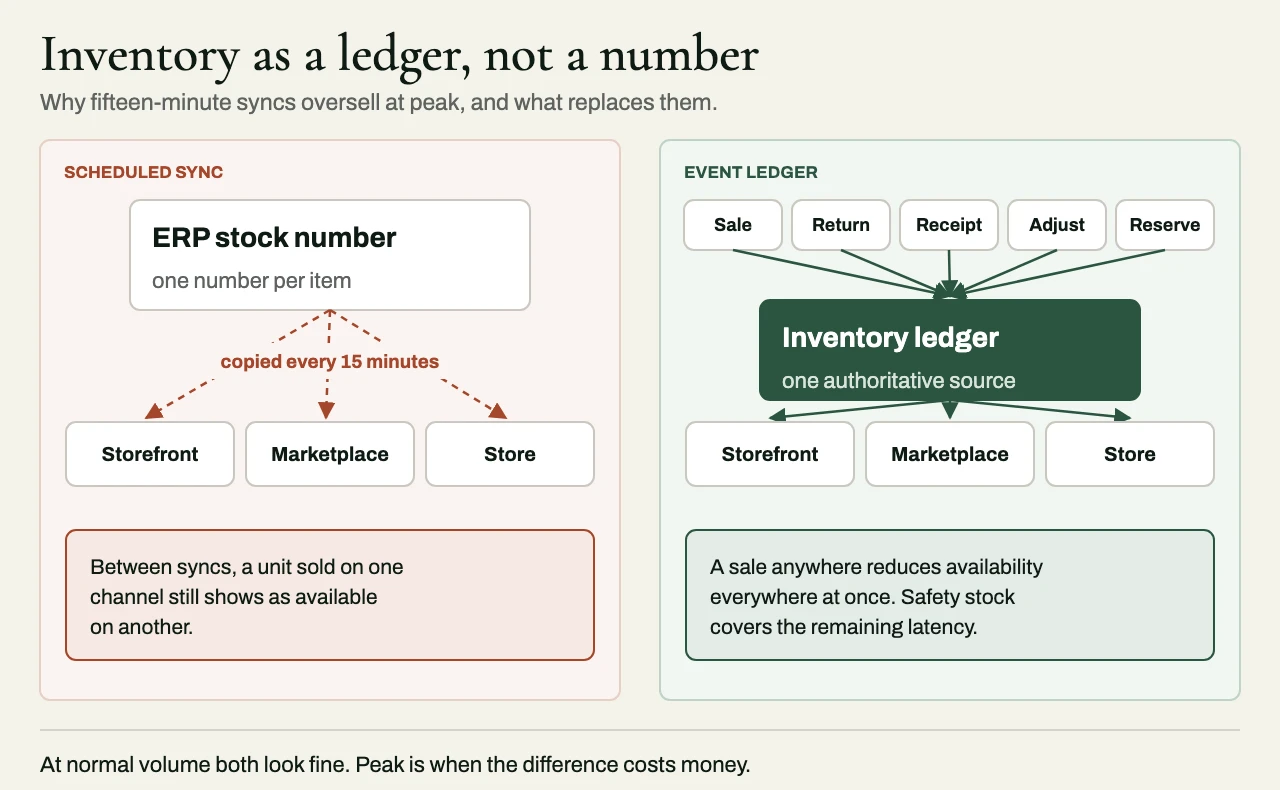
The most important design decision in the whole integration is where available-to-sell inventory lives, and how changes to it reach every channel. Syncing a stock number from the ERP every fifteen minutes works perfectly well – until demand outpaces the interval. At peak, a unit sold on one channel can still show as available on another until the next sync, and the business finds out through cancellations and, on marketplaces, penalties.
A sturdier model treats inventory as a stream of events – sales, returns, receipts, adjustments and reservations – applied to a single authoritative ledger that every channel reads from. A sale anywhere then reduces availability everywhere at once. There will always be some latency, and for fast-selling items, safety stock buffers are the sensible protection against it. But the gap between seconds and fifteen minutes is the gap between an occasional edge case and a failure you can predict.
Orders: accept fast, process steadily
Shopify will accept orders far faster than most ERPs can create them, and it’s the integration’s job to absorb that difference, so the ERP never feels it. The sound pattern is to receive order events immediately and put them on a durable queue, then create orders in the ERP at a rate the ERP can sustain, with retries and backoff when it slows down. Order creation should be idempotent, keyed on the Shopify order ID, so a retry can never produce a duplicate. And both the depth and the age of the queue should be monitored, with alerts that fire well before the backlog starts to affect fulfillment.
Looked at this way, a queue that grows during a flash sale and drains over the following hour is a sign of a healthy system. An integration that falls over the moment the ERP slows down is in trouble.
Respect the API limits
Shopify’s Admin GraphQL API uses cost-based rate limiting, and webhooks arrive with all the retries and duplicates that come with at-least-once delivery. Per-item calls that did no harm at normal volume become the bottleneck at peak, so inventory updates should be batched, instead of going out one call per item, and bulk operations should be used for large catalog and order volumes. The integration should keep track of its cost budget and back off before it reaches the limits (and not after), and it should process webhooks idempotently and reconcile against the API afterward, so anything delivered twice, or not at all, gets caught.
Rate limits and API capabilities vary by Shopify plan and API version, so check the client’s plan before you design around them.
Test for the peak you expect
Load testing the integration matters as much as load testing the storefront, and in my experience it’s done far less often. A useful test has four steps:
- Replay a recorded day of real order traffic at multiples of normal volume.
- Slow the ERP down on purpose, and confirm that the queue absorbs the difference.
- Inject duplicate and out-of-order webhooks, and check that nothing is processed twice.
- Reconcile orders and inventory across systems once the test is over.
Run the test early enough to fix what it finds. A load test held the week before the peak mostly just tells the team what’s about to go wrong.
From our case studies: one inventory source of truth
This example is from eProxim’s published case studies, anonymized to the industry.
An omnichannel retailer sold the same catalog through its own website, several marketplaces and its physical stores. Each channel kept its own view of stock, reconciled to the ERP by syncs every fifteen minutes through a tangle of point-to-point connections. At peak, units sold on one marketplace still showed as available on another, and the result was oversells, cancellations and marketplace penalties.
eProxim replaced the point-to-point connections with a middleware layer that takes in stock, order and fulfillment events from every channel, the ERP and the warehouses, and keeps a single real-time inventory ledger. The order lifecycle runs as events, with retries and reconciliation, so no message gets lost under load.
The result was 99.9% inventory accuracy across every channel, with stock changes reaching every channel in under a second, where they used to be synced every fifteen minutes, and a peak sale at four times normal volume absorbed without a rebuild. Adding a marketplace or a warehouse became a matter of configuration, with no new integration to build. Read the full e-commerce case study.
Related reading
- Idempotent webhooks: duplicates, retries and out-of-order events
- NetSuite Salesforce integration: keeping CRM and ERP in agreement
- Integration reconciliation reports: proving two systems agree
Working with eProxim
eProxim doesn’t run a Shopify practice. We work alongside Shopify agencies and partners, and build the layer between Shopify and the back office: ERP integration for inventory, pricing, orders and fulfillment status, multi-store catalog sync, and the event-driven architecture that holds up at peak.
Bring us the Shopify back-office work you’d rather not hire for. See our Shopify partner page, or start a partner conversation.