A customer opens a ticket asking why they were charged twice. The support agent can see the whole conversation in Zendesk, but the invoice, the payment and the credit memo all live in Sage Intacct – a system the agent can’t open, and arguably shouldn’t. So the ticket goes to finance, finance replies two days later, and by then the customer has written three more times.
A Zendesk Sage Intacct integration closes that gap. Done well, it gives support enough financial context to answer billing questions on first contact, and it gives finance a controlled way to act on decisions made in support, without turning the helpdesk into a back door into the general ledger. In this article, I’ll cover what each side actually needs, three integration patterns, and the design decisions that decide whether finance will sign off on the result.
What support needs, and what finance needs
The two teams want different things from the integration, and that’s where the design should begin – the APIs can wait.
| Team | Needs | Should not get |
|---|---|---|
| Support | Account status, open and recent invoices, payment status, credit memos, contract or subscription dates | The ability to post transactions, change customer financial records, or see other customers’ data |
| Finance | Visibility of billing disputes, refund or credit requests with an approval trail, and early warning of collection problems | Unstructured email requests that nobody can reconcile or audit |
| Both | One agreed identity for each customer across both systems | Two customer records, each of which its own system believes is the correct one |
Most of the value comes from the first row – read-only financial context, put in front of the agent, inside the ticket.
Three integration patterns
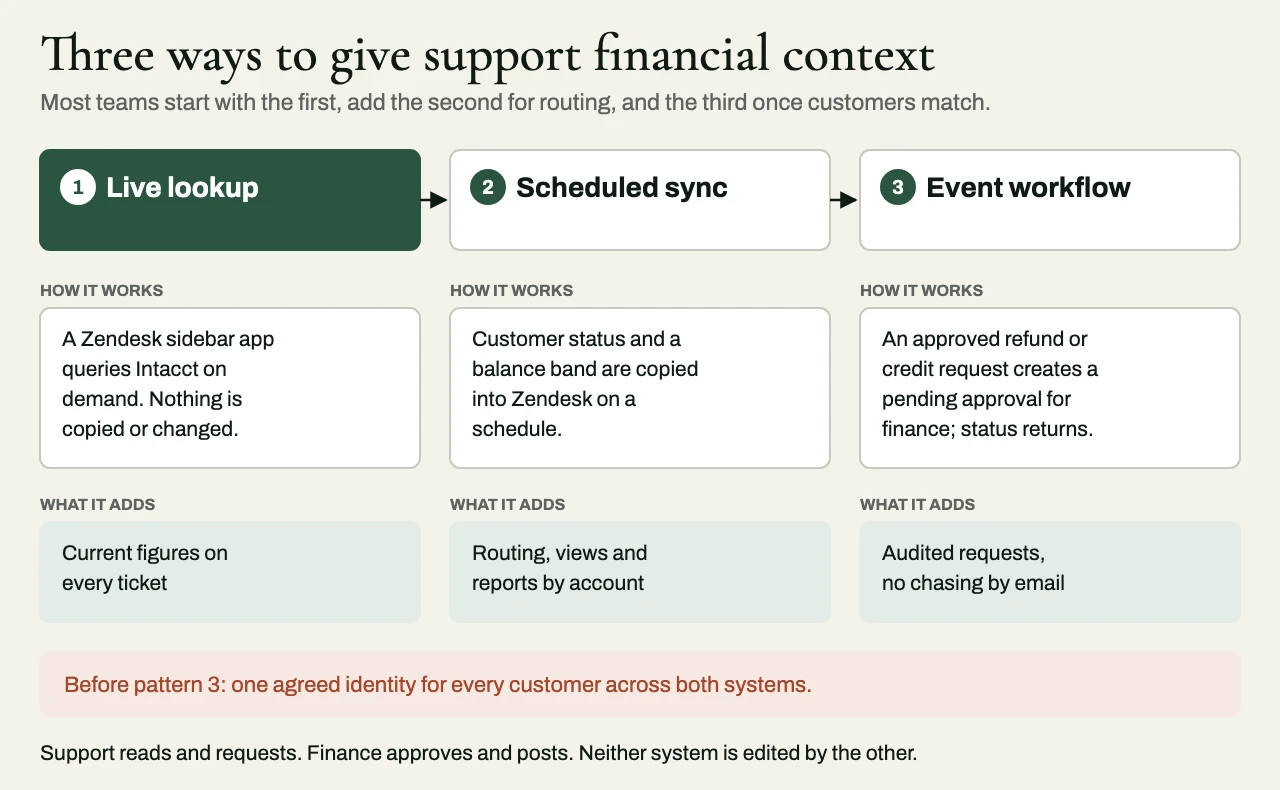
1. Read-only lookup in the agent workspace
In the first pattern, a Zendesk app in the ticket sidebar looks up the requester’s organization in Sage Intacct on demand, and shows recent invoices, balances and payment status. The great thing about it is that no data gets copied and nothing in Intacct can change, so the agent always sees current figures. The price is that every lookup is a live call. The integration has to cope gracefully with Intacct’s API limits, with latency and with outages, and the credentials have to sit on a server, where the browser can’t reach them. For most organizations, this is the right place to start.
2. Scheduled synchronization of customer and billing summaries
The second pattern copies customer records and a few chosen billing fields – account status, say, or an outstanding balance band, or a contract renewal date – from Intacct into Zendesk organizations on a schedule. Once those fields live in Zendesk, triggers, views, routing and reporting can all use them, so tickets from customers with overdue balances can go to a specialist queue automatically. What you give up is freshness. The data is only as current as the last synchronization, and every synchronized field needs an owner and a rule for settling conflicts. This pattern earns its place when routing and reporting depend on financial status.
3. Event-driven workflow from support to finance
In the third pattern, a ticket event in Zendesk – an approved refund or credit request, for example – starts a workflow that creates a pending record or an approval request for finance, and stops short of posting a transaction. When finance acts, the status flows back into the ticket. Finance gets structured requests it can audit, and support sees the outcome without having to chase anyone. But this is the pattern that writes to the financial system, so it carries the most design responsibility, mostly around approvals, idempotency and a clear audit trail. It suits organizations that handle a steady volume of billing disputes, credits or refunds through support.
Many teams start with the first pattern, add the second for routing, and bring in the third only after they’ve solved the customer identity problem.
The hard part: matching customers
Zendesk thinks in users and organizations. Sage Intacct thinks in customers, often spread across several entities, with parent-child relationships and dimensions on top. The same company can be one Zendesk organization and three Intacct customer records (or the other way around), and the integration is only as trustworthy as the link between them.
So several decisions have to be made before anyone writes code. The first is which system owns customer identity, and which identifier links the two – because matching on company name or email domain is exactly how an integration ends up showing one customer another customer’s invoices. The second is how to handle customers billed by more than one legal entity, which may mean showing both, with each entity clearly labeled. The third is what happens when no match is found, and the answer should be a visible exception that someone resolves; the integration should never guess. The last is how merges and other changes carry across, since over time customer records get merged, renamed and re-parented in both systems, and the link has to survive all of it.
It’s far cheaper to get the dimensional and customer structure right before integration than to repair it afterward, once the integration has hardened the wrong one in place.
Controls finance will ask for
If the integration touches financial data at all, finance will quite reasonably ask a series of questions, and the design should have answers ready. They’ll want to know who can see what, which is an argument for limiting financial fields to the agent roles that really need them (support staff serving a retail customer may have no reason to see a wholesale account’s credit limit). They’ll ask which credentials the integration uses. The right answer is a dedicated Intacct integration user with the minimum permissions required, whose credentials are stored on a server and rotated.
Finance will also ask whether a ticket can create a financial transaction. Ideally, it can only do so as a request that finance approves, and if credits or refunds below some threshold do get posted automatically, both the threshold and the policy behind it belong to finance. They’ll ask what prevents duplicates, since a ticket updated twice, or a workflow retried after a timeout, must never create two credit requests – which is why each request needs a unique key tied to the ticket. And they’ll ask for an audit trail, so that every request can be traced from Intacct back to the ticket, the agent and the approver.
Smart Events and Smart Rules on the Intacct side can enforce part of this at the platform level, so invalid data gets turned away at the door instead of turning up in a report later.
Interfaces and practical constraints
On the Intacct side, transactional integration goes through the Sage Intacct Web Services API (and, on newer tenants, its REST API) for customers, invoices, payments and related records. On the Zendesk side, the Support API, webhooks and triggers, and the apps framework for sidebar applications cover all the patterns above.
Check current API capabilities and limits for both platforms against the client’s subscription before committing to a design.
A few practical things catch teams out again and again. API limits apply on both sides, and a sidebar app that calls Intacct every time any agent opens any ticket can use up the capacity on a busy morning, so it should cache sensibly and only call when someone opens the panel. Time zones and accounting periods have to line up, so that “last month’s invoices” means the same thing in both systems. Sandbox data rarely looks like production, which is why customer matching should be tested against a copy of real records, with personal data handled properly. And outages need a designed response – when Intacct is down, the sidebar should say so plainly, and not show a misleading zero balance.
A sensible rollout
- Agree on the customer identity link and fix the records that don’t match.
- Ship read-only lookup to a pilot group of agents, and measure how many billing tickets get answered without a handoff to finance.
- Add synchronized status fields where routing or reporting needs them.
- Introduce support-to-finance requests with approval, idempotency and audit in place from day one.
- Hand over runbooks and monitoring so that someone finds out the synchronization has stopped before a customer does.
A client example: billing credits without re-keying
The situation
A subscription software business handled 700 to 900 billing-related tickets a month in Zendesk, with finance in Sage Intacct. Agents were allowed to promise a goodwill credit within a policy limit, but finance had to key each adjustment into Intacct by hand, and because the same request sometimes arrived both in a ticket and in an emailed spreadsheet, some credits were posted twice.
The approach
We kept Intacct as the authoritative record of every credit, and used Zendesk to capture the dispute and the amount requested. A Zendesk workflow submitted a structured credit request carrying the ticket ID, the mapped customer account, the invoice reference, a reason code and the amount. Our middleware validated the customer and the invoice against Intacct, turned away requests for closed periods or invoice lines that had already been credited, and enforced the policy limits. Approval happened in a controlled workflow with named finance approvers, and support staff had no way to give themselves accounting privileges.
Each request carried a unique ID, and before any retry the integration checked Intacct for an existing transaction with that reference, so a retry after a timeout never produced a second credit. Agents saw the status in the ticket – submitted, awaiting approval, posted or rejected – along with the credit reference once it existed, and finance got a daily reconciliation of approved requests against posted credits.
The outcome
Over the pilot, manual re-keying fell by 80%, the median time to issue a credit dropped from three business days to one, and there were no duplicate postings at all. Each approved request kept a complete audit trail, from the ticket through finance’s approval to the credit posted in Intacct.
Related reading
- Integration reconciliation reports: proving two systems agree
- Idempotent webhooks: duplicates, retries and out-of-order events
Working with eProxim
eProxim doesn’t run a Sage Intacct or a Zendesk practice. We work alongside the partners who own those platforms and the client relationship, and we build the layer between them – Intacct integration for invoices, payments, journal entries and dimensions, event-driven and scheduled synchronization with reconciliation that finance can rely on, and the controls that keep support-to-finance workflows auditable. We can deliver the work under your brand, as a scoped work package with acceptance criteria, or through engineers embedded in your team.
Have a client asking for Zendesk and Sage Intacct to talk to each other? Take a look at our Sage Intacct partner page, or start a partner conversation.