The choice between real-time vs batch integration in SAP gets made far too early in most projects, usually in a workshop where someone says “the business wants real-time” and nobody asks what that means in minutes. Real-time sounds modern and batch sounds like something to apologize for, so the question tends to be settled by mood. In practice, an S/4HANA system offers a range of timing options, from a nightly file to a synchronous API call that answers in under a second, and each point on that range has its own costs in coupling, load, monitoring and recovery.
In this article, I’ll set out what the options actually are in S/4HANA (batch IDocs and extracts, near-real-time IDocs, synchronous OData calls and business events), how each one behaves when something goes wrong, and how I decide between them flow by flow. The short version is that the right answer is almost always a mix, and the mix should be chosen per business flow, with the cost of being late written next to the cost of being fast.
SAP capabilities vary by release, deployment model and license. Confirm the specifics against the client’s own SAP systems.
What “real-time” means in an SAP system
The word covers at least three different things, and confusing them causes most of the bad designs I see. The first is synchronous: a caller asks SAP a question, or asks it to do something, and waits for the answer, as when a web shop checks availability or a portal creates an order through an OData API. The second is event-driven: SAP announces that something has happened, a sales order created or a delivery changed, and interested systems react within seconds, without SAP waiting for any of them. The third is near-real-time messaging, where an IDoc is created and sent as soon as the business document is saved, so the receiving system sees it within moments even though nobody is waiting on a response.
Batch, at the other end, means grouping work and moving it on a schedule. That can be a nightly extract to a data platform, but it also covers IDocs that are collected and sent every fifteen minutes, which most business users would happily call real-time if nobody told them.
| Pattern | Typical latency | Who waits | Coupling | Failure behavior |
|---|---|---|---|---|
| Scheduled extract or file | Hours | Nobody | Low | Whole batch late or partial; visible next morning |
| Collected IDocs or change pointers | Minutes to hours | Nobody | Low to medium | Individual IDocs fail; needs status monitoring |
| IDoc sent immediately | Seconds | Nobody | Medium | Individual IDocs fail; needs status monitoring |
| Business event plus API read | Seconds | Nobody | Low | Consumer misses or repeats events; needs replay and reconciliation |
| Synchronous OData or API call | Sub-second to seconds | The caller | High | Caller sees the error at once; SAP availability becomes the caller’s problem |
The batch end of the range
Batch has a bad reputation it only partly deserves. A scheduled extract is simple to build, easy to rerun and kind to SAP, because the load arrives at a time someone chose. For reporting feeds, data platforms, periodic financial postings and anything that a human only looks at once a day, it is often the honest answer.
SAP’s own messaging has batch behavior built in. In the partner profile, an outbound IDoc can be passed to the communication layer immediately, or collected with other IDocs for the same partner and message type and sent later by the RSEOUT00 report. SAP recommends collecting, especially for master data, because it spreads the load. Master data changes usually travel through change pointers: SAP logs that a material, customer or vendor changed, and the RBDMIDOC report (transaction BD21) turns the pointers into IDocs when it runs. SAP’s documentation suggests running it daily for materials, customers and vendors and hourly for batches, and many systems run it every few minutes, which is near-real-time in all but name. On the inbound side, an IDoc can be processed as soon as it arrives or left for the RBDAPP01 background report, and an inbound IDoc sitting in status 64 is usually one waiting for that job to run.
The real weakness of batch is that its failures are quiet and late. A job that didn’t run, or ran with half the data, is discovered when somebody notices the numbers are wrong, and by then the next batch has run on top of it. Batch needs the same monitoring and reconciliation as any other interface, and it rarely gets them.
Synchronous calls: fast, and coupled
When a caller genuinely can’t proceed without SAP’s answer, a synchronous call is the right tool. On S/4HANA that usually means OData services, either SAP’s released APIs or services built for the purpose. SAP’s newer APIs are increasingly built on OData V4 with the ABAP RESTful application programming model, while a large body of OData V2 APIs remains in use, and some V2 APIs are being deprecated as V4 successors are released, with models that differ enough that callers have to adapt. Both versions support $batch requests, which let a caller group operations into a change set and cut down round trips.
The cost of synchronous integration is coupling. Every caller now depends on SAP being up, being fast and having capacity to spare, and SAP’s response time becomes part of the caller’s user experience. A web shop that checks availability in SAP on every product page view has made SAP part of its front end, and the first marketing campaign will show what that means. The usual protections are a cache or a replicated read model for anything read far more often than it changes, timeouts and circuit breakers on the caller, and an API layer that gives callers a stable contract while SAP changes underneath it.
I keep synchronous calls for two situations: commands where the caller needs SAP’s validation before it can tell the user anything (creating an order, reserving stock) and reads where staleness would be costly and volume is modest. Everything else is a candidate for events or batch.
Business events: real-time without waiting
S/4HANA publishes business events when business objects change. SAP’s reference architecture counts more than 600 standard events across finance, sales, procurement and manufacturing, and custom events can be added with the ABAP RESTful application programming model. The S/4HANA side is set up through Enterprise Event Enablement: a channel connects the system to a broker, and outbound bindings choose which events travel on it. The broker is SAP Event Mesh or, in recent releases, SAP Integration Suite, advanced event mesh, which SAP positions for higher volumes and for deploying brokers closer to where events are produced. SAP’s events use the CloudEvents envelope, with a type, a source, an ID, a timestamp and the data.
Two details shape every event design. First, many standard events are notification events, which carry the object’s key and little else, so a consumer that wants the business data has to call an API to read the current state. That extra call is usually a good thing, because it means order stops mattering (the consumer always reads the latest state), but it puts read load back on SAP, and the design has to account for it. Second, events can be missed or delivered more than once, like any message, so consumers need to be idempotent and there needs to be a way to catch up. The patterns are the same ones I describe in idempotent webhooks: record the event ID under a unique constraint, acknowledge quickly, process from a queue, and reconcile periodically against the source.
Events suit flows where several systems care about the same change and SAP shouldn’t need to know who they are. A delivery created in SAP can be picked up by the warehouse, the carrier booking service and the customer notification service, each at its own pace, without SAP waiting on any of them.
Choosing, flow by flow
I make the decision per business flow, by answering four questions in writing.
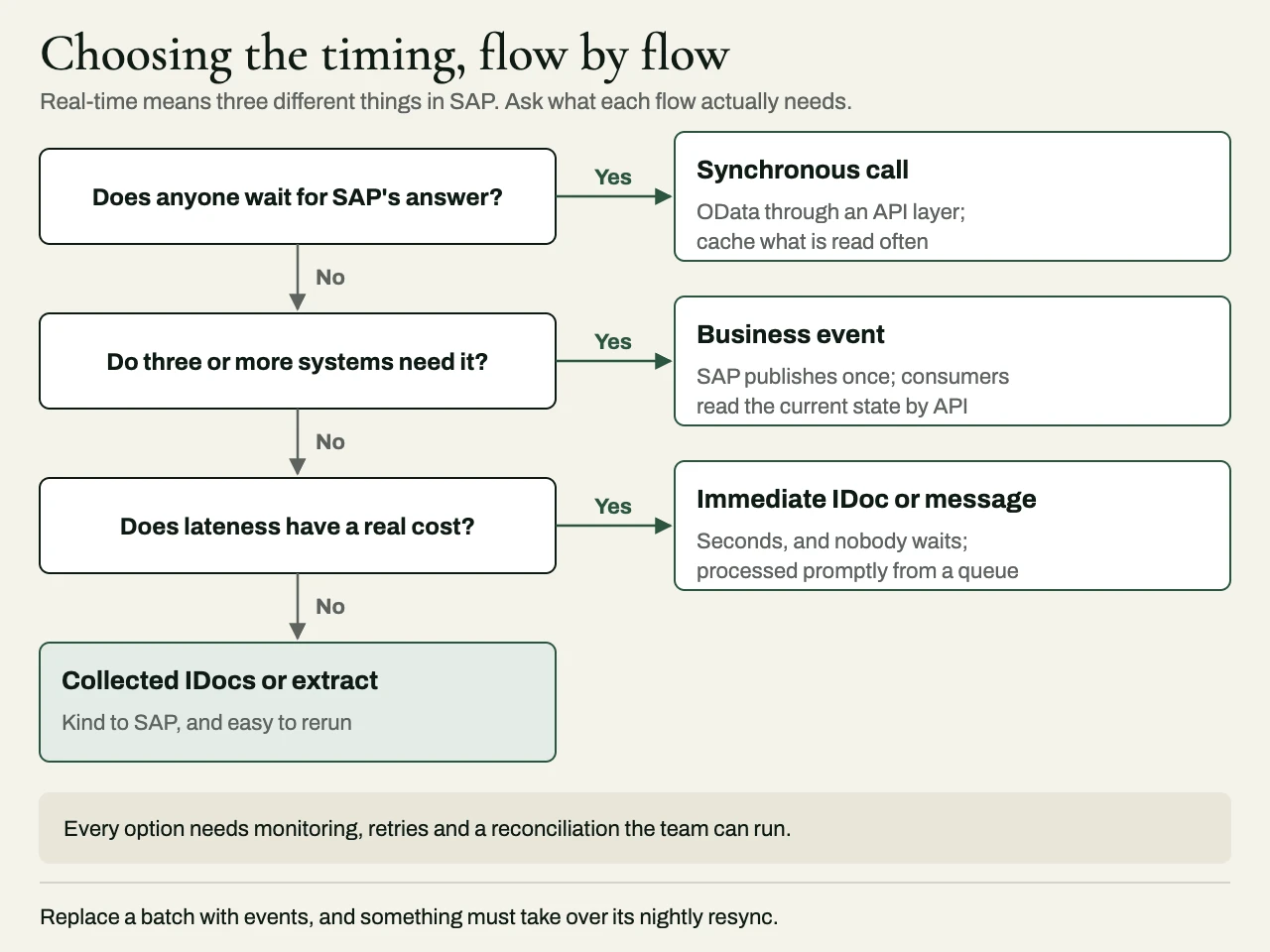
What does lateness cost, in business terms? If stock levels on the website are an hour old, how many oversold orders does that cause on a normal day, and on a peak day? If the finance feed is a day late, does anyone notice before month-end? An answer in money or customer impact settles most debates quickly.
Does anyone have to wait for the answer? If a person or a process can’t continue without SAP’s response, the flow is synchronous whatever else is true. If nobody waits, it shouldn’t be.
How many systems need it? One consumer can be served by a direct interface. Three or more consumers of the same change point toward events, so SAP publishes once.
How will a failure be noticed and repaired? Every option needs monitoring, retries and reconciliation, and the right choice is one the client’s team can actually run. A real-time design that nobody can troubleshoot at night is worse than a batch job everyone understands.
| Flow | Usually best fit | Why |
|---|---|---|
| Availability check from a web shop | Synchronous read through an API layer with caching | Customer is waiting; reads vastly outnumber changes |
| Sales order from e-commerce into SAP | Asynchronous message with acknowledgment, or synchronous create with a queue fallback | Order must not be lost; customer shouldn’t wait on SAP’s availability |
| Deliveries to a warehouse system | Immediate IDoc or event | Warehouse works in near-real-time; no one waits on SAP |
| Goods movements from a warehouse into SAP | Asynchronous messages, processed promptly | Stock accuracy matters; volume can spike at shift end |
| Material and customer master to satellites | Change pointers or events, plus periodic full reconciliation | Many consumers; occasional misses are inevitable |
| Finance and analytics feeds | Scheduled extract | Consumed on a schedule; easy to rerun |
Hybrids, and the batch you keep
Most good SAP integrations are hybrids. An event tells the consumer that something changed, an API call fetches the current state, and a nightly reconciliation compares the two systems and repairs whatever the events missed. That last part is what people forget when they replace batch with events: the batch job was also, quietly, a full resynchronization every night, and when it goes away, something has to take over that job.
Moving from batch to events is also safest in stages. The SAP integration options guide describes running the batch interface alongside its event-driven replacement until the two agree for several cycles, and retiring the batch only when every consumer has moved. On an S/4HANA program, the migration is often the natural moment to make the change, though I’d limit it to the flows where lateness has a real cost; what happens to your integrations in an S/4HANA migration covers how to sort those from the rest. Warehouse flows are the clearest case for speed, and connecting a warehouse management system to SAP goes through them message by message.
Illustrative scenario: a composite of common situations, not a specific client. A distributor sends stock levels from SAP to its online store in a nightly file, and the sales team asks for real-time stock. The first design has the store call SAP’s API on every product page. A per-flow review shows that stock only changes when goods are received, picked or adjusted, so the better design publishes an event whenever stock changes (a standard event where one fits, a custom one where it doesn’t), has a small service read the new quantity and update the store’s own stock table, and keeps the nightly file as a reconciliation that flags any difference. The store gets current figures, SAP sees a read per stock change instead of a read per page view, and the nightly job has become a safety net.
Related reading
- Integration reconciliation reports: proving two systems agree
- Shopify ERP integration at peak
- How to scope integration work in a statement of work
How we approach it at eProxim
eProxim doesn’t implement SAP; we build the layer between SAP and the systems that depend on it, and we have been doing integration engineering since 1997. On SAP work that means monitored IDoc interfaces, API layers in front of OData services, event-driven flows with idempotent consumers and replay, and the reconciliation that proves the systems agree. We work alongside the system integrator or SAP partner on the program, and we never compete with them for the client.
Our SAP integration page describes the interfaces we work through and the requests we see most. If you have SAP flows that are slower than the business needs, or faster than anyone can support, talk to us about them.