A WMS SAP integration connects a warehouse management system, the software that runs bins, picking, packing and labor on the warehouse floor, to the SAP system that owns orders, deliveries, inventory value and the financial consequences of every stock movement. It is one of the oldest integration patterns in the SAP world and still one of the most fragile, because the two systems each hold a version of the same truth (how much of what is where) and the business notices immediately when they disagree. A warehouse that can’t see a delivery can’t ship it, and an SAP system that hasn’t heard about a receipt can’t sell the stock.
This article goes through how the conversation between the two systems is structured: how SAP sends deliveries and orders out to the warehouse, how the warehouse sends confirmations and goods movements back, which IDocs and APIs carry each message, and where these integrations usually break. It also covers the decision that should come before any of that on an S/4HANA system, which is what kind of warehouse product sits on the other end.
SAP capabilities vary by release, deployment model and license. Confirm the specifics against the client’s own SAP systems.
First, which warehouse system?
On S/4HANA, the question “how do we connect the WMS?” has three different answers depending on what the warehouse runs, and the integration work differs a great deal between them.
SAP EWM. Extended Warehouse Management can run embedded in S/4HANA (available since release 1610) or as a separate, decentralized system. SAP’s training material notes that, from an ERP point of view, EWM is technically a decentralized solution even when embedded. In the decentralized setup, the ERP is the leading system for master data, which moves through ALE and IDocs or the Data Replication Framework, while deliveries and other transactional data move over qRFC. In the embedded setup, master data doesn’t need to be transferred at all. This is SAP-to-SAP integration with standard content, and the work is mostly configuration, monitoring and queue management.
Stock Room Management. Classic Warehouse Management (LE-WM) ran inside S/4HANA under the compatibility scope until the end of 2025, and SAP replaces it with Stock Room Management, which reuses most of LE-WM. SAP’s own list of what Stock Room Management leaves out includes decentralized WM, the warehouse control unit interface, task and resource management, cross-docking and wave management. Any warehouse integration built on those components has to be redesigned, either around EWM or around an external WMS, and I’d raise that early in a migration (the wider picture is in what happens to your integrations in an S/4HANA migration).
A third-party WMS. Many warehouses connected to SAP run a WMS from another vendor, or one their logistics provider operates. Here SAP’s delivery interface does the work: SAP sends the warehouse what to do, and the warehouse confirms what it actually did. The rest of this article is mostly about this case, since it is where the integration engineering lives.
Who owns what
Most WMS integration problems start as ownership problems. SAP owns the commercial and financial side: the sales order, the purchase order, the delivery as a business document, the stock quantity by plant and storage location, and its valuation. The WMS owns the physical side: which bin, which pallet, which picker, which wave, which license plate. Neither system should try to hold the other’s detail. SAP doesn’t need bin-level stock for a third-party-managed warehouse, and the WMS shouldn’t decide when revenue is recognized.
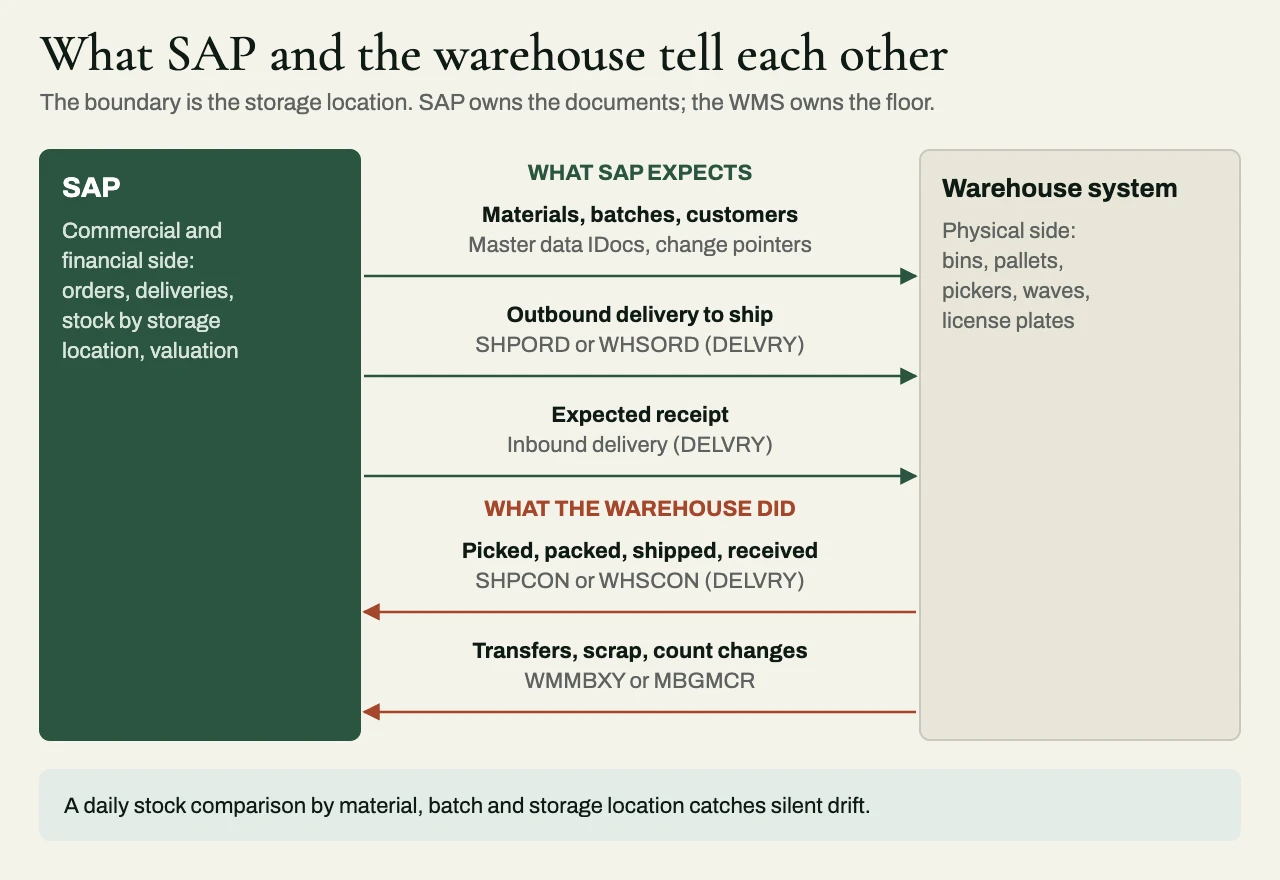
The boundary is usually drawn at the storage location. SAP treats the warehouse as one or more storage locations whose quantity it trusts the WMS to report, and every physical event that changes that quantity has to come back to SAP as a posting. Once the boundary is written down, every message in the integration either tells the warehouse what SAP expects or tells SAP what the warehouse did.
Outbound from SAP: deliveries and orders
The core outbound message is the delivery. When an outbound delivery is created in SAP for a sales order or stock transfer, SAP sends it to the warehouse as an instruction to pick, pack and ship. SAP’s delivery interface offers two message types for this: SHPORD, intended for an external service provider such as a third-party logistics firm, and WHSORD, intended for the company’s own external warehouse system over ALE. SAP’s documentation describes them, along with DESADV and CARNOT, as identical in content and different only in meaning, and all of them are built on the DELVRY basic IDoc type (DELVRY03 in SAP’s documentation, with later versions in newer releases). Choosing between them is mostly a matter of which partner type and output determination the client already uses.
Inbound deliveries follow a similar path in the other direction of the supply chain. When a supplier sends an advance shipping notification as a DESADV IDoc, SAP can create an inbound delivery from it, and that inbound delivery is then passed to the warehouse as the expected receipt. If the supplier doesn’t send notifications, the inbound delivery is created in SAP from the purchase order and sent on in the same way. Either way, the warehouse receives against an expected document, which is what makes over- and under-receipts visible.
Master data flows outbound too. The WMS needs materials, units of measure, batches and customer ship-to details, and these usually travel as master data IDocs driven by change pointers, on a schedule frequent enough that a new material exists in the warehouse before its first delivery does. Timing between master data and deliveries is a classic source of failures, which I’ll come back to.
Inbound to SAP: confirmations and goods movements
Messages from the warehouse fall into two groups, and they need different interfaces.
Delivery confirmations. When the warehouse has picked, packed or shipped a delivery, it confirms that against the delivery itself, using SHPCON (from an external provider) or WHSCON (from the company’s own warehouse system), again on the DELVRY IDoc type. SAP’s documentation describes what a confirmation can do, each driven by a qualifier in the IDoc: confirm picked quantities, adjust delivery quantities, report batch split items, confirm weights and volumes, create and repack handling units, post goods issue, or delete the delivery. A single confirmation can carry the picked quantities and the goods issue together, which is what most warehouses send when a truck leaves. For a client already on S/4HANA’s APIs, the released outbound delivery API offers equivalent actions, including posting goods issue on a delivery.
Goods movements not tied to a delivery. Receipts without an inbound delivery, transfers between storage locations, scrapping, cycle count adjustments and issues to production all change stock without touching a delivery. The classic message for these is WMMBXY on the WMMBID02 IDoc type, processed in SAP under process code WMMB, which posts a goods movement as if it had been entered in SAP. The alternative is the MBGMCR IDoc, which calls the BAPI_GOODSMVT_CREATE function module, and practitioners generally treat it as the newer of the two. On S/4HANA, the released Material Document API can create goods movements over OData as well, though SAP’s guidance is that receipts against an inbound delivery should go through the delivery confirmation and not through that API.
| Direction | Business event | Classic IDoc | API route on S/4HANA |
|---|---|---|---|
| SAP to WMS | Outbound delivery to pick and ship | SHPORD or WHSORD (DELVRY) | Business event where available, then outbound delivery API read |
| SAP to WMS | Expected receipt | Inbound delivery as a DELVRY IDoc (message type depends on setup) | Check what is released for the client’s version |
| Supplier to SAP | Advance shipping notification | DESADV (DELVRY) | Not usually a WMS concern |
| WMS to SAP | Picked, packed, shipped | SHPCON or WHSCON (DELVRY) | Outbound delivery API, including post goods issue |
| WMS to SAP | Receipt against inbound delivery | SHPCON or WHSCON (DELVRY) | Check what is released for the client’s version |
| WMS to SAP | Transfer, scrap, adjustment, receipt without delivery | WMMBXY (WMMBID02) or MBGMCR | Material Document API |
| SAP to WMS | Materials, batches, customers | Master data IDocs via change pointers | Events or replication APIs |
The choice between IDocs and APIs follows the reasoning in the SAP integration options guide. Most third-party WMS products already speak the delivery IDocs, and for a warehouse that is the deciding argument more often than not.
Timing
Warehouse flows are the clearest case for near-real-time integration. A delivery that reaches the warehouse an hour late misses a carrier cutoff, and a receipt that posts in SAP an hour late leaves stock unsellable for an hour. So deliveries are usually sent the moment they are created, and confirmations are processed as they arrive. At the same time, warehouses produce bursts (every shipment confirmed at the end of a wave, every count adjustment at the end of a shift), and an interface that processes every message synchronously against SAP will slow down exactly when the dock is busiest. Asynchronous messages, processed promptly from a queue, handle both. Real-time vs batch integration with SAP S/4HANA covers the trade-offs in general terms.
Where WMS integrations break
Sequencing. A delivery arrives in the warehouse before the material master that it references, or a confirmation arrives in SAP while the delivery is still locked by a user editing it. Both are ordinary, and both need a retry policy that waits and tries again instead of failing the message permanently.
Duplicates. Warehouses resend confirmations after timeouts, and operators re-scan. A goods issue that posts twice is a real financial error. The integration needs an idempotency key per warehouse transaction, checked before posting, and the APIs help here: posting goods issue on a delivery that has already been issued is rejected. The same patterns as idempotent webhooks apply.
Changes after release. Sales changes a quantity or cancels an order after the delivery has gone to the warehouse. The integration needs a defined rule, agreed with the warehouse, for which changes are allowed after release and how the WMS is told.
Unit and status mismatches. The WMS counts in eaches and SAP in cases, or the WMS has fourteen statuses and SAP cares about three. Every mapping table needs an owner.
Silent drift. Even a well-built interface drifts. A daily stock comparison by material, batch and storage location between the WMS and SAP, with a person responsible for every difference, is the control that finds what the error monitoring missed.
Illustrative scenario: a composite of common situations, not a specific client. A manufacturer replaces classic WM in one plant with a third-party WMS during its S/4HANA move. The first build sends deliveries and receives shipment confirmations, and testing passes. In the first week of the pilot, stock in SAP starts drifting from the warehouse, because count adjustments, scrap and transfers to the production staging area were never in scope; they had always happened inside WM. The fix is a goods movement interface on WMMBXY for those movement types, a mapping of warehouse reason codes to SAP movement types agreed with finance, and a daily stock comparison that would have caught the gap on day one.
A checklist before you build
- Which warehouse product is on the other end: embedded EWM, decentralized EWM, Stock Room Management or a third-party WMS?
- Is the ownership boundary written down, by storage location, with SAP and WMS responsibilities listed?
- Is every physical stock movement in the warehouse mapped to an SAP posting, including the unglamorous ones (counts, scrap, transfers, returns)?
- Which message type and IDoc version does each flow use, and does the WMS vendor support it?
- What happens to a delivery changed or canceled after release to the warehouse?
- What is the idempotency key for each inbound transaction, and where is it checked?
- How are sequencing failures retried, and when does a message go to a person?
- Who owns the daily stock reconciliation, and who resolves the differences?
Related reading
- Integration reconciliation reports: proving two systems agree
- Shopify ERP integration at peak
- How to scope integration work in a statement of work
How we approach it at eProxim
eProxim doesn’t implement SAP or sell a warehouse product, so we have no stake in which WMS a client chooses. We have been building integrations since 1997, and on warehouse work we build and monitor the delivery and goods movement interfaces, the mappings, the retry and idempotency handling, and the stock reconciliation that tells everyone the two systems still agree. We work alongside the firm implementing SAP or the WMS, and we never compete with it for the client.
Our SAP integration page describes how we work on SAP systems. If you are connecting a warehouse to SAP, or untangling a connection that has stopped agreeing with itself, talk to us about it.