A Salesforce partner subcontractor, as I’ll use the term here, is a firm that a Salesforce consulting partner brings into its own client program to deliver a defined piece of the work – most often the integration and data layer – while the partner keeps the org, the advisory relationship and the client. The arrangement is common, but it’s rarely planned with much care. Partners tend to reach for a subcontractor once an integration has already slipped, and then work out the division of labor in the middle of a sprint.
Our guide to white-label subcontracting covers the general mechanics: identity, communication rules, contracts and pricing. This article is narrower, and specific to Salesforce delivery. It looks at the particular moments in a Salesforce program when an integration subcontractor earns its place, what each party should own at those moments, how the subcontractor’s work fits into the partner’s SOW and delivery methodology, and what a practice head or delivery lead should look for before handing anyone access to a client’s sandboxes.
The line that makes the arrangement work
Every subcontracting arrangement that works on a Salesforce program rests on a clear boundary, and the one that holds up best is the boundary of the org itself. Inside the org are the data model, the declarative configuration, the page layouts and flows, the security model, and the conversations with the client about how the business should run. Outside it are the ERP, the billing platform, the warehouse, the data warehouse, the legacy systems and whatever middleware connects them. The partner owns the first territory, with no qualifications. The subcontractor is brought in for the second.
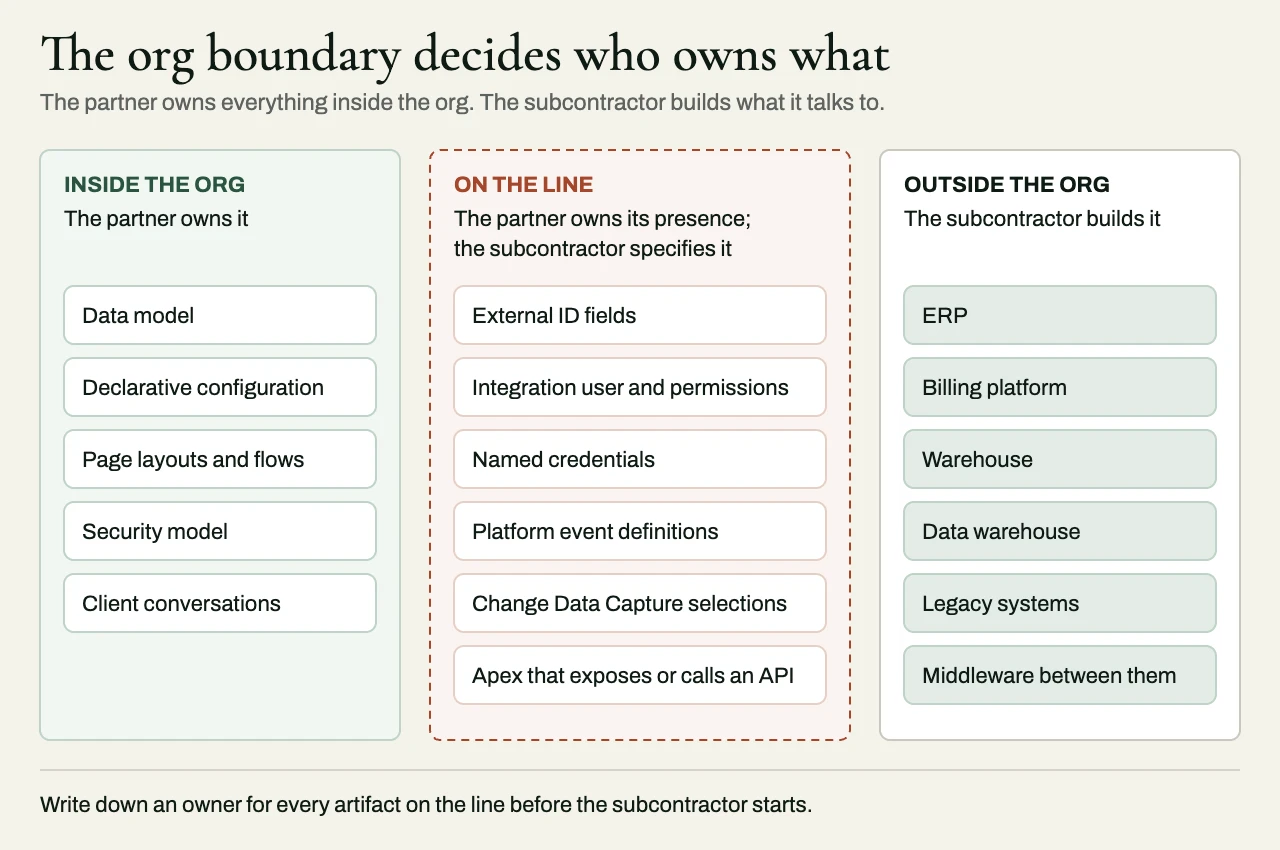
The boundary isn’t perfectly clean, and pretending it is causes trouble. Some artifacts sit right on the line: external ID fields used for matching, the integration user and its permission set, named credentials, platform event definitions, Change Data Capture selections, and any Apex that exposes or consumes an API. Each of these needs an owner, and the sensible default is that the partner owns its presence in the org, while the subcontractor specifies what it needs and builds against it. Writing that down early stops the integration team from adding a field to production without asking – or the Salesforce team from renaming one the middleware depends on.
Five moments when partners bring in a subcontractor
Partners rarely engage an integration subcontractor for “integration” in the abstract. They engage one at moments you can recognize, and each comes with its own shape of work and its own risks.
When the ERP has to stay in sync
The most common trigger is someone saying, in the discovery workshop, that the client’s ERP – NetSuite, SAP, Dynamics 365 or something older – will remain the system of record for customers, products, pricing, orders or invoices. From that moment on, the Salesforce build depends on a two-way synchronization that the partner’s consultants are seldom equipped to design. The decisions that matter here are about ownership and conflict: which system wins for which field, what happens when an order changes after it has been created in the ERP, and how either side can prove that the numbers agree. Our article on NetSuite and Salesforce integration works through those decisions for one common pairing, and the reasoning carries over to other ERPs.
When quoting, billing and revenue cross systems
CPQ and revenue programs look self-contained during the sale, and they rarely are. The quote may live in Salesforce, but subscriptions are billed in Zuora or Stripe, revenue is recognized in the ERP, and usage comes in from the client’s own product. The partner configures the catalog and the quoting experience. The subcontractor builds the flows that turn a closed opportunity into a subscription, carry amendments across, and bring invoice and payment status back, so that account teams aren’t working from stale data. This is where you need to tell a billing platform’s implementation partner and an integration partner apart, because the two roles are quite different.
When the legacy data will not migrate cleanly
Data migration is the work Salesforce proposals underestimate most often, because it looks like a loading exercise until somebody profiles the source. Fifteen years of accounts in a legacy CRM, duplicated across regions and keyed inconsistently, is an engineering problem. It needs profiling, cleansing rules, deduplication and survivorship logic, staged loads with rollback, and validation reporting the client’s team can sign off against. A subcontractor is useful here precisely because the work is bounded and well defined – and because, so often, it decides whether the go-live date holds.
When MuleSoft is already in the estate
Some clients have already invested in MuleSoft, and the program needs more senior Anypoint capacity than the partner’s practice can staff for the length of it. The work might be building the system and process APIs the org will consume, cleaning up an estate that has grown without governance, or moving point-to-point interfaces onto an API-led structure. An integration subcontractor fits naturally into this gap, as long as it works within the client’s existing MuleSoft conventions and doesn’t import its own.
When the program is already in trouble
The last moment is the least welcome one: a program that is late, over budget or failing user acceptance testing, where the root cause turns out to be in the integration or the data, and outside the org. Rescue starts with diagnosis, before any building, and by then the partner’s credibility is already under strain. Our guide to rescuing an ERP or Salesforce project describes what that diagnosis should cover and what goes into a credible recovery plan.
Where the subcontractor fits in each phase
Most Salesforce partners run some version of the same delivery sequence, whatever their methodology calls it: discovery, design, build, testing, deployment and hypercare. An integration subcontractor should show up in every phase, with a defined role and a defined artifact to hand back. If it arrives only at the build phase, it inherits decisions that were made without it.
| Program phase | Partner owns | Integration subcontractor’s role | What it hands back |
|---|---|---|---|
| Pre-sales and scoping | Proposal, commercial terms, client relationship | Reviews the integration scope before the price is fixed; finds hidden interfaces and licensing dependencies | Interface inventory, integration assumptions and risks for the SOW |
| Discovery | Workshops, business process design, org data model | Joins the sessions on system boundaries as a member of the partner’s team; profiles the source data | System-of-record table, data profiling findings, a recommended integration pattern |
| Design | Solution design, security model, configuration approach | Designs interfaces, mappings, error handling and reconciliation; specifies what it needs in the org | Interface specifications, field mappings, a list of boundary artifacts the partner will create |
| Build | Org configuration, declarative build, in-org development | Builds the middleware, external services, migration jobs and the integration side of each interface | Working interfaces in the partner’s repositories and integration sandboxes |
| System and integration testing | Test plan, org-level testing, defect triage | Tests failure paths, retries, volumes and reconciliation; fixes integration defects | Test evidence in the partner’s templates, reconciliation reports |
| UAT | Client sign-off, training, business acceptance | Helps resolve defects through the partner; never presents to the client unless invited | Fixes, explanations the partner can pass on, updated runbooks |
| Cutover and go-live | Cutover plan, client communication, go/no-go | Runs the migration loads, switches on interfaces, watches the first transactions | Load validation reports, cutover log, rollback readiness |
| Hypercare and support | Client relationship, ongoing org support | Monitors, fixes and hands over; can carry on under a managed agreement | Runbooks, a walkthrough, monitoring and alert configuration |
Two things about this table are worth stressing. The subcontractor is most valuable before the price is fixed, because an interface nobody counted in the proposal will still get built – at somebody’s expense. And in no phase does the subcontractor take on a client-facing role of its own. It may sit in on a discovery session or a cutover call, but only as part of the partner’s team, and only when the partner invites it.
Writing it into the SOW
The partner signs one statement of work with the client and a second one with the subcontractor, and most of the commercial friction in these arrangements comes from the two documents drifting apart. The fix is to make the integration scope a single shared artifact that both statements of work point to, so that neither one restates it. An interface inventory does this job well – a list of every flow, with its source, target, direction, trigger, volume, system of record and acceptance criteria. Our article on scoping integration work in a statement of work explains how to build one, and the integration SOW template gives you a structure to start from.
Salesforce programs also carry dependencies that belong, explicitly, in both documents, because they sit with the client and neither firm can resolve them alone. These include API access on the ERP side, which some vendors license separately; the client’s Salesforce edition, and the API request allocation that comes with it; sandbox availability and refresh schedules, since a partial copy or full sandbox refreshed at the wrong moment can wipe out weeks of integration test data; and whether the client’s ERP team is available for testing. If they’re listed as assumptions with named owners, a delay in any one of them becomes a change request, and nobody has to argue about it.
Acceptance criteria should be written in terms the client can check. You can’t test “Orders synchronize to the ERP”. You can test “Closed-won opportunities create sales orders in the ERP within five minutes, failures are retried and then alerted, and a daily reconciliation report lists any order present in one system and not the other”.
Practical friction points on Salesforce programs
Four problems come up often enough that they’re worth settling before the subcontractor starts.
Environments. The integration needs sandboxes connected to non-production instances of the ERP and the billing systems, and those connections are usually harder to arrange than anything on the Salesforce side. Agree early on which sandbox is the integration environment, and who is allowed to refresh it.
The integration user. Interfaces should log in as a dedicated integration user, with a permission set scoped to just the objects and fields they need – never as some consultant’s personal login. The partner should own that user, since it governs access to the client’s org, and the subcontractor should specify the permissions it requires.
API consumption. A synchronization designed with no thought for the org’s API allocation, or one that makes a separate call for every record where a bulk or composite request would do, can work perfectly well in a sandbox and then fail in production during the first large load. Volumes belong in the design, well before anyone has to write a post-mortem.
Deployment. Boundary artifacts that live in the org, such as fields, platform events and named credentials, should travel through the partner’s normal deployment pipeline. Middleware and external services travel through their own. The cutover plan has to sequence the two, so that no interface is ever switched on before the metadata it depends on has arrived.
What to look for in an integration subcontractor
Beyond the general vetting questions about contracts, identity and handover, four questions matter on Salesforce programs. The first is whether the firm has a Salesforce implementation practice of its own. If it does, it’s a potential competitor inside your account. The second is whether it understands the systems on the far side of the boundary in real depth – the ERP’s data model, the billing platform’s subscription semantics, the quirks of the legacy source – and not just the Salesforce APIs. Most integration failures happen on the side the Salesforce team understands least. The third is whether it designs for failure as a matter of course: idempotent processing, retries with dead-letter handling, audit trails, and reconciliation reports that prove two systems agree, instead of assuming that they do. The fourth is whether it’s willing to work inside your methodology, your board and your deployment pipeline, without running a parallel project alongside yours.
A client example. A Salesforce delivery partner brought us in about three months into a Service Cloud deployment for an industrial equipment manufacturer, which had roughly 180,000 historical service cases spread across two legacy support databases. The migration trial reported around 97% of rows loaded, but the service supervisors kept finding cases attached to the wrong customer accounts. The cause was in the source data. Each regional database assigned its own customer numbers, so 10482 in one wasn’t necessarily the same customer as 10482 in the other, and the original mapping had treated that number as globally unique. On top of that, a single corporate customer often had several service-site records, spelled and addressed differently.
Our mandate was narrow: the migration data model, the crosswalk, the deduplication rules and the reconciliation evidence. The partner kept the Service Cloud configuration, the cutover and go-live, and every conversation with the client. We built a persistent cross-reference keyed by source system plus source record ID, with separate mappings for the legal account, the service site and the contact. Likely duplicates were scored on tax identifiers where they existed, normalized names and addresses, and account relationships, and the uncertain ones went to the business for review. Two rehearsals later, 179,420 of the 180,000 cases loaded, 430 were excluded under an agreed retention rule, and 150 were held for manual ownership review. What mattered to the partner was that every one of those records had an explanation, which the 97% figure never gave anyone.
Related reading
- White-label subcontracting for integration work
- How to scope integration work in a statement of work
- Rescuing an ERP or Salesforce project
How we approach it at eProxim
eProxim works on one side of the org boundary only. We don’t run a Salesforce implementation practice, we don’t do org configuration, declarative build or administration, and we don’t bid against the partners who do. We sign a mutual non-solicit on Salesforce work. What we build is everything the org has to talk to: ERP and finance synchronization, billing and external APIs, middleware for systems that were never designed to be integrated, event streaming, and data migration with validation reporting. Partners use us as a scoped work package inside a program, as an embedded bench under their own brand, or as an escalation partner when a program has gone wrong – in which case we respond the same business day and start with a one-day deep dive.
Our services for Salesforce partners set out where the line sits, and our white-label delivery page and partner FAQ explain how the arrangement runs. If your next Salesforce program depends on an integration you’d prefer not to staff yourself, start a partner conversation.